


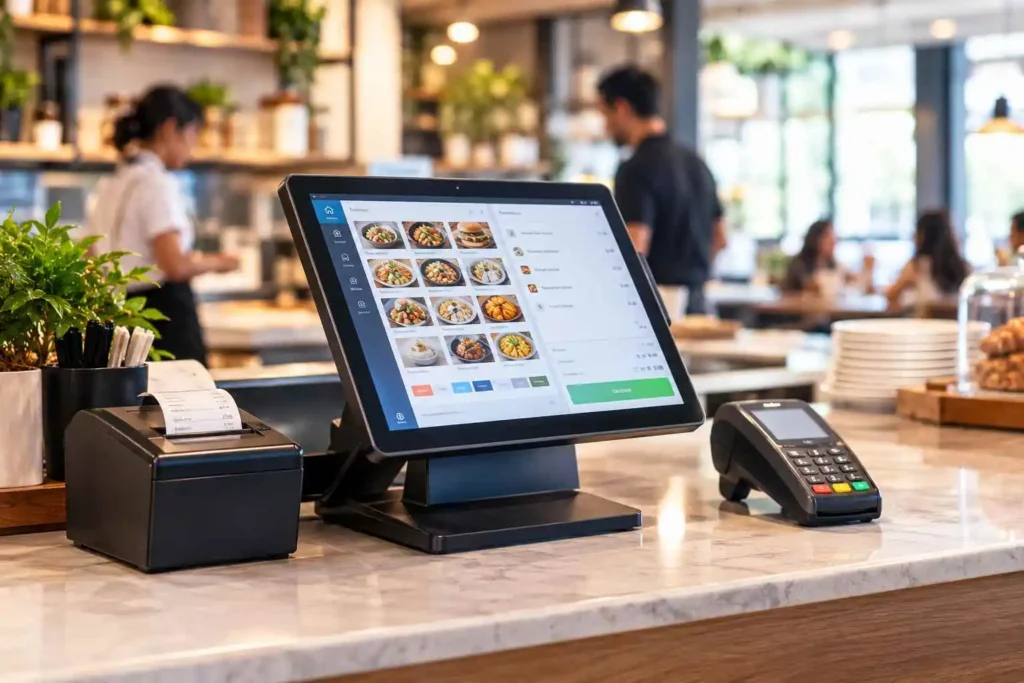
If you have ever watched a cashier tap an order into a screen, print a receipt and open a cash drawer in one motion, you have seen a POS system at work. For the owner, the real questions are bigger: what does a POS system actually do, which type fits your counter, and what does it cost to get the choice wrong?
This guide explains what a POS system is, how it works and what it is made of. It untangles the terms people mix up, answers the “free POS system” question honestly and covers the FBR rules that make Pakistan different. It comes from the CherryBerry RMS team in Lahore. We build restaurant software, so we know restaurants best and say plainly where a retail shop needs a different tool.
A POS system (point of sale system) is the combination of hardware, software and payment tools a business uses to take orders, accept payment, print receipts and record every sale. Modern cloud POS systems also track stock, staff and sales reports, and in Pakistan they can issue FBR-compliant invoices at checkout.
POS System Basics at a Glance
- POS stands for point of sale: the moment and place where a customer pays.
- “POS machine”, “POS terminal” and “POS software” are different things, so check what a quote includes.
- A restaurant POS is built around orders. A retail POS is built around products and barcodes.
- “Free” can mean a demo, a trial, free setup or a limited plan. It rarely covers hardware, payments, support and compliance.
- In Pakistan, FBR and provincial invoicing rules can decide which POS you are allowed to use.
What Is a POS System?
A POS system is everything a business uses to complete and record a sale: the screen or terminal the cashier uses, the software behind it, the printer and cash drawer, and the way payments are taken.
An old cash register added up a bill and opened a drawer. A modern POS system does that and keeps going. It updates stock, records which cashier made the sale, feeds the day’s numbers into reports, and in Pakistan can send the invoice to FBR.
POS system vs billing software
Billing software produces an invoice. A POS system produces the invoice and also handles the order, the payment, the stock change and the report. Many Pakistani businesses search for “billing software” when they mean a POS, because billing is the part they notice first. If customers pay at a counter or table, you want a POS.
POS Terms Explained: POS Machine, POS Terminal, POS Software and More
These words get used as if they mean the same thing. They do not, and the difference matters when you compare quotes.
- POS system: the whole setup, meaning software, hardware and payment tools together.
- POS software (or POS application): the program that takes orders, calculates bills and records sales on a computer, tablet or phone.
- POS terminal: the screen and computer at the counter where the cashier works.
- POS machine: a loose term. People use it for a card payment terminal, a billing terminal or the whole setup, so always ask which one is meant.
- Payment terminal: a device that only takes card payments. It does not manage orders, stock or reports.
- Mobile POS (mPOS): POS software on a phone or tablet, often with a small card reader.
- ePOS (electronic point of sale): another name for a modern, computerised POS system.
In Pakistan this matters because a price for a “POS machine” may cover only a card terminal, while a price for a “POS system” should include software, hardware and support. Ask for an itemised quote, and use our restaurant POS software price guide to see what belongs on it.
How Does a POS System Work?
- Order entry. The cashier or waiter adds items by tapping the screen, scanning a barcode or accepting an online order.
- Calculation. The system totals the bill and applies tax and discounts.
- Payment. The customer pays by cash, card or digital wallet, and the system records the method.
- Receipt or invoice. A receipt prints or is sent digitally. Where the law requires it, the invoice also carries a fiscal number and QR code.
- Back-end update. Stock goes down, the sale joins the day’s totals and the cashier is logged against it.
- Reporting. Owners see sales by item, hour, branch or cashier.
Picture a typical cafe order in Lahore. A customer asks for two coffees and a sandwich. The cashier taps three items, the customer pays by card and the receipt prints. The sandwich ticket reaches the kitchen printer, the bread and coffee beans come off stock, and the owner sees the sale in the day’s report. One entry, four results.
What Are the Parts of a POS System?
POS hardware
Terminal or tablet, receipt printer, cash drawer, barcode scanner, card terminal and, in restaurants, a kitchen printer or display. Before accepting a bundle, ask whether the software works with equipment you already own.
POS software
The software is the brain. It holds your menu or product list, calculates bills, manages staff permissions and builds reports. Good POS software also keeps customer profiles and loyalty records, and connects to inventory, accounting, online ordering and the kitchen.
Payment processing
This is how the money moves: cash, cards and digital wallets. Some POS providers also process card payments and take a fee on each transaction, while others leave payments to your bank. Ask which model you are signing up for, because it changes your real cost.
Cloud POS vs On-Premise POS: Which Type Do You Need?
A cloud based POS system, also called a cloud POS system, stores your data on remote servers and runs on any internet-connected device. An on-premise POS stores data on a computer or server inside your shop.
A cloud POS lets you check sales from your phone and push a price change to every branch at once. It needs a connection to sync, so ask any vendor to demonstrate what happens when the internet drops, which matters in Pakistan where internet and power cuts are a practical concern. With CherryBerry RMS, staff re-open the system on any connected device and keep billing while the connection recovers, and the data syncs when it returns.
To go deeper, read how cloud-based POS systems work, the comparison of cloud POS vs traditional POS or our complete guide to cloud-based restaurant POS.
Which Businesses Need a POS System?
Any business where customers pay at a counter, a table or the doorstep benefits from a POS. What each one needs is different:
- Restaurants, cafes and coffee shops: tables or tokens, modifiers, kitchen tickets and fast checkout.
- Fast-food outlets and ice-cream shops: speed at the counter, combo deals and many small orders per hour.
- Cloud kitchens: several delivery channels and brands feeding one queue.
- Bakeries: quick billing plus barcode scanning for packaged items.
- Supermarkets and general stores: barcodes, SKUs, supplier orders and stock counts.
- Pharmacies and clothing shops: expiry tracking, size and colour variants, returns and exchanges.
- Salons and hotels: appointments and staff commission, or room charges alongside restaurant billing.
CherryBerry RMS is built for the first four: restaurants, cafes and coffee shops, fast-food and ice-cream outlets, cloud kitchens and bakeries. The others are better served by a POS designed around their own workflow.
What Is a Restaurant POS System?
A restaurant POS system is POS software built around orders rather than products. People also say restaurant POS software or restaurant POS systems. It manages tables, modifiers, kitchen tickets and split bills, and takes ingredients off stock as dishes sell. What it adds on top of a basic till:
- One queue for every order: dine-in, takeaway, delivery, phone and WhatsApp orders.
- Menus with modifiers and split bills: no onions, extra cheese, combos, with manager-only voids.
- Kitchen routing: tickets go to a printer or display, linked to kitchen management.
- Ingredient-level stock: dishes deduct ingredients, which feeds restaurant inventory management.
- Multi-branch control: one dashboard for every outlet, plus order management and the rider app for delivery.
For the full feature list, read our restaurant POS features worth testing, or explore the cloud-based POS system for restaurants to see it in action.
What Is a Retail POS System?
A retail POS system is POS software built around products. It scans barcodes, manages SKUs with variants, handles returns and exchanges, tracks stock counts and supports supplier purchase orders.
POS system for retail store: what to look for
- Barcode scanning and a product catalogue with SKUs, variants and bulk import.
- Returns and exchanges: refunds, store credit and stock adjustments in one flow.
- Stock counts and low-stock alerts, so you reorder before shelves go empty.
- Supplier purchase orders inside the same system.
- Customer profiles, loyalty and online sync if you also sell through a website.
If you run a general store, a clothing shop or a pharmacy, choose a POS built around barcodes and SKUs. CherryBerry RMS is not that product, and we would rather tell you so than sell you the wrong tool. If your bakery or cafe also sells packaged goods, ask any vendor to demo with your real product list. For a shortlist by business type in Pakistan, see our guide to the best point of sale software in Pakistan.
Restaurant POS vs retail POS: the key differences
- Unit of sale: a dish with modifiers in a restaurant, a product with a barcode in retail.
- Checkout flow: order first and pay later (tables and tabs) in a restaurant, scan and pay at once in retail.
- Stock and returns: ingredients and rare remakes in a restaurant, finished goods and frequent exchanges in retail.
- Extra hardware: kitchen printers and displays in a restaurant, barcode scanners and label printers in retail.
Is There a Free POS System?
Yes, free POS systems exist, but free usually means the software has no monthly fee. You still pay for hardware, payment processing, support and anything the free plan leaves out.
What “free” can mean when you shop for a POS in Pakistan
- Free demo: a guided walkthrough that costs nothing.
- Free trial: full access for a limited period, then you pay.
- Free setup: installation is free, but the software or hardware is not.
- Free plan: no monthly fee, with limits on users, registers or features.
- Free integration service: a tax-reporting connection offered at no charge. It covers compliance, not a full POS.
Where the cost shows up in a free POS system
- Hardware: the terminal, printer and cash drawer still need buying.
- Payment fees: some free plans tie you to their own payment service and take a fee on each card payment.
- Limits and add-ons: one register, few users, basic reports, and kitchen, accounting or online ordering locked behind paid tiers.
- Support: self-service setup, with slow or paid help when something breaks at 8 pm.
- Compliance: a free tool built for another country may not print an FBR invoice number and QR code.
Five questions to ask before you pick a free POS
- Is it free for good, or only for a trial period?
- Which payment provider am I tied to, and what does it charge per transaction?
- How many registers, users and branches does the free plan allow?
- Is it approved or integrated for FBR and provincial reporting?
- Can I export my data, and what will it cost when I add a second branch or a kitchen display?
Free POS vs paid POS: when each makes sense
A free POS can be enough for a single low-volume counter with no tax-integration requirement, or for a stall or home-based food business testing demand. A paid POS usually earns its cost once you have more than one branch, a kitchen to connect, FBR or provincial invoicing, live reports or a need for support during service hours.
Free POS in Pakistan: what to check
Under the 2025 sales tax rules, as summarised by KPMG Pakistan, PRAL can act as a licensed integrator and must provide integration services free of cost on request, and FBR may make downloadable invoicing or POS software available at no charge. Those cover the compliance side. Check separately whether they also give you kitchen routing, stock control and multi-branch reports, which restaurants usually need.
CherryBerry RMS is not a free product. Pricing depends on your needs and plan, and we offer a free demo so you can test it on your own menu. Our restaurant POS software price guide explains what drives the cost.
How to Set Up a POS System in 7 Steps
- List what you sell: menu or catalogue, prices, categories and tax rates.
- Choose compatible hardware: terminal, printer, cash drawer and scanner that work with your software.
- Create staff accounts and roles for cashiers, managers and owners.
- Enter business and tax details. If FBR or provincial rules cover you, register each point of sale through your integrator.
- Connect payment methods: cash, cards and digital wallets.
- Run test orders: a normal sale, a refund, a void and a daily report.
- Train the team and go live in a quiet shift, with a backup nearby for the first day.
Replacing an older system? Our cloud POS guide includes a section on migrating without losing a weekend of sales.
What Does a POS System Do for a Business?
It speeds up billing and cuts mistakes, shows live stock and sales by item, hour and branch, and keeps staff accountable through role-based permissions, so a cashier can bill but only a manager can void. It also reduces double entry by feeding your books through restaurant accounting software and produces tax-ready invoices at checkout. With a cloud POS you can check any branch from your phone, as explained in our guide to running a restaurant remotely. For examples of what better data changes, see how restaurant POS software boosts food sales and how a POS inventory management system cuts waste.
POS Systems in Pakistan: What FBR Rules Mean for Your Choice
In Pakistan, the POS you choose is also a compliance decision. According to KPMG Pakistan’s January 2025 summary of the revised Sales Tax Rules, restaurants, cafes, coffee shops, eateries, snack bars and hotels remain covered as integrated persons and must issue electronic invoices through an approved, integrated POS. Whether a retail shop is covered depends on its type and size, so retailers should confirm their status with an accountant. The same summary points to these practical rules:
- Invoices carry an FBR fiscal number and a QR code.
- If internet or power fails, invoices issued offline must be uploaded within 24 hours of restoration.
- Integrated outlets display a signboard stating the integration with FBR, along with the POS software registration number.
- Integration is done through licensed integrators, and PRAL can also act as one.
Provincial bodies such as the Punjab Revenue Authority (PRA) have their own invoicing requirements, and rules change, so always confirm the current position with FBR, your provincial authority or your accountant. The advice is the same in Lahore, Karachi or Islamabad. Our FBR POS invoicing system page shows how the invoice number and QR code are created at checkout.
How to Choose a POS System
Start with the business you run, not the feature list.
- Match the type. Orders and tables point to a restaurant POS. Barcodes and SKUs point to a retail POS.
- Check tax compliance first. Ask whether FBR and provincial invoicing work today, and ask to see it live.
- Test your busiest hour. Watch a cashier close a typical bill and count the taps.
- Ask what happens when the internet drops. Get a demonstration, not a promise.
- Look at real reports. Ask for yesterday’s report from a demo account, not a polished screenshot.
- Check the connections and security. Kitchen, stock, accounting and online orders should share one set of data, with role-based access and separate backups.
- Get the year-one cost in writing, including hardware, setup, training and payment fees, and ask how you export your data if you leave.
If you accept cards or store customer details, the NIST Small Business Cybersecurity Corner offers free, practical guidance, and a good POS provider should be able to explain how it handles access control and backups. For a restaurant-specific checklist, see what to look for in a cloud POS.
Mistakes to avoid
- Buying on price alone and finding out later that tax reporting or support costs extra.
- Comparing a quote for a card machine with a quote for a full POS system.
- Skipping the demo on your own menu or product list.
Before you commit, run the 30-minute test in our guide to the best point of sale software in Pakistan.
How Much Does a POS System Cost?
Cost depends on the pricing model (monthly subscription or one-time licence), the number of terminals and branches, hardware, modules such as kitchen display or inventory, tax integration, and setup and training. Ask each provider for a year-one total in writing so quotes can be compared fairly. Our restaurant POS software price guide breaks down each factor and the hidden costs to ask about.
Where CherryBerry RMS Fits
CherryBerry RMS is a Lahore-based restaurant management platform. The POS takes dine-in, takeaway, delivery, WhatsApp and phone orders into one queue, routes tickets to the kitchen, deducts stock, shows every branch on one dashboard and prints the FBR invoice number and QR code at checkout for restaurants covered by FBR rules. Around it sit restaurant accounting, table reservation, online ordering and the rider app, all running off the same data. Support runs 24/7 for the features we offer, with onboarding and training for your team.
It is built for restaurants, cafes, bakeries and cloud kitchens. If that is your business, book a free demo and see it working on your own menu. If you are in Lahore, our cloud POS system in Lahore guide covers local setup and support.
Frequently Asked Questions About POS Systems
What does POS stand for?
POS stands for point of sale. It means the moment and place where a customer pays for goods or a service, such as a restaurant counter, a shop till or a delivery handover.
What is the difference between a POS machine, a POS terminal and a POS system?
A POS terminal is the screen and computer at the counter. A POS machine is a loose term that people use for a card payment terminal, a billing terminal or the whole setup. A POS system is the complete package of software, hardware and payment tools. Always ask what a quote includes.
Is there a free POS system?
Free POS systems exist, but free usually means the software subscription only. Hardware, payment processing, support, integrations and tax compliance can still cost money. Check what the free plan limits, and whether it can issue FBR-compliant invoices if you operate in Pakistan.
Is a free trial the same as a free POS system?
No. A free trial gives full access for a limited time and then asks you to pay. A free demo is a guided walkthrough. A free plan has no monthly fee but limits users, registers or features. Ask which of these an offer really is before you start entering your menu.
Can a POS system work without internet?
It depends on the provider. On-premise systems run locally, while cloud systems need a connection to sync. Ask for a live demonstration of an outage. With CherryBerry RMS, staff re-open the system on any connected device and keep billing, and the data syncs when the connection returns.
Do I need FBR integration for my POS in Pakistan?
It depends on your business type and size. According to KPMG Pakistan’s 2025 summary, restaurants, cafes, coffee shops, eateries, snack bars and hotels remain covered by FBR’s integration rules. Rules change, so confirm with FBR, your provincial authority or your accountant.
Next Step
Want to see how a POS system handles your menu, your branches and FBR invoicing? Contact CherryBerry RMS to book a free demo.