


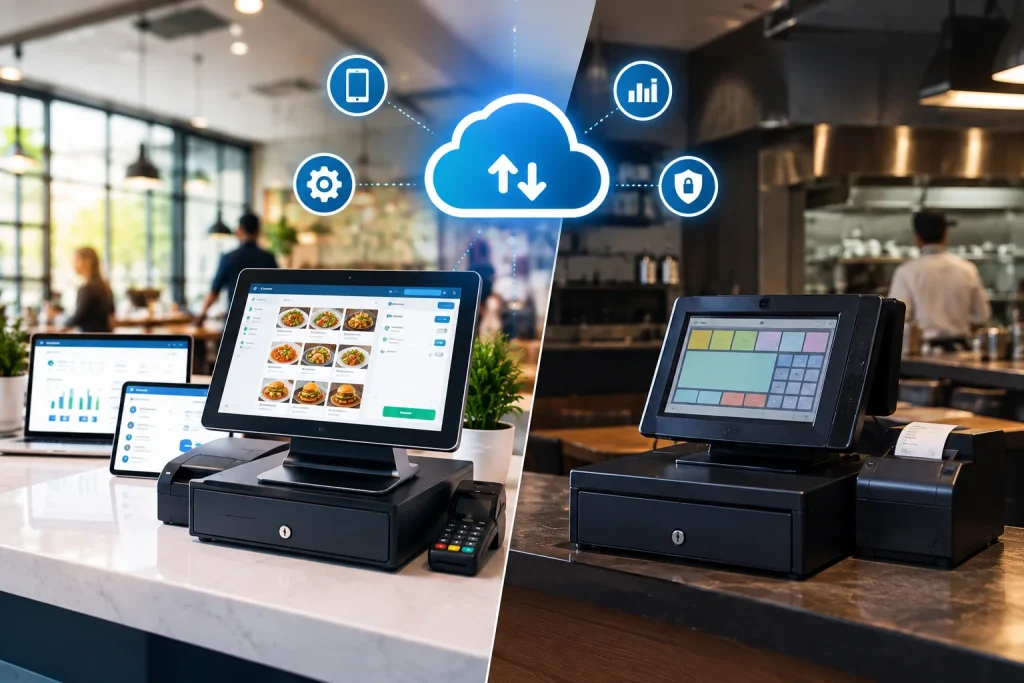
Cloud POS stores your data on remote servers and runs as a monthly subscription. Traditional POS stores data on a machine inside your restaurant and is bought outright. Cloud wins on remote access, updates, multi-branch management and recovery from hardware failure. Traditional still holds an edge where internet connectivity is genuinely unreliable and the existing hardware is already paid for.
A point-of-sale system is a platform that allows businesses to carry out transactions and payments, store data regarding customers, and use it to make business decisions. There are two POS systems at work; traditional and cloud-based. Today, customers demand flexibility to pay and request several payment options based on their convenience. Other than this, the robustness and efficiency of a POS system are also important as it influences not only the business but also customer satisfaction. Read this blog to find out why restaurants choose to use cloud-based POS systems over traditional systems. This blog post will navigate the changing trends leading to the discussion of cloud-based POS vs traditional POS
Understanding Cloud-Based POS vs Traditional POS System
Cloud-based POS vs traditional POS system, an ongoing debate between the researchers and the business owners. For many years the POS was a cashier’s counter, and a cash register was maintained. Now, with the advent of newer and better technologies and tools, the very same POS has shifted to online platforms. The traditional POS system stored information on hardware with a staff member to always present at the site to collect, store, interpret, and retrieve data manually.
Cloud-based POS, however, is a platform where all the data is stored on the cloud and requires minimum hardware. The storage, retrieval, and analysis of data is done automatically and with greater accuracy. There has been a sudden shift of interest from using traditional POS towards cloud-based POS. The shift is attributed to several benefits of the new system such as greater accuracy, better efficiency, and cost-effectiveness.
It helps to be precise about what “cloud” actually means here, because vendors use the word loosely. The National Institute of Standards and Technology defines cloud computing around a set of characteristics including on-demand self-service, broad network access, and resource pooling. Applied to a restaurant, that translates to something specific: you do not own or maintain the servers, you reach the system over the internet from any device, and capacity scales without you buying anything. A system that merely backs up to the internet overnight is not cloud POS. Ask any vendor where the software actually runs.
Cloud POS vs Traditional POS: The Full Comparison
This is a comparison article, so here is the comparison in one place.
Traditional (on-premise) POS | Cloud-based POS | |
Where data lives | A server or terminal inside your restaurant | Remote data centres, off-site |
Purchase model | Bought outright, capital expenditure | Monthly or annual subscription, operating expenditure |
Upfront cost | High: licences, server, terminals | Lower: subscription plus devices |
If a terminal breaks | Service stops at that till until it is fixed | Open the system on another device and continue |
If the local server fails | Whole outlet down, data at risk | No local server to fail |
If the internet drops | Local billing often continues; reporting and online orders stop | Depends on connectivity, so a backup line is essential |
Software updates | Manual, scheduled, often billed separately | Automatic, included |
Backups | Whoever remembered to run one | Automated and off-site |
Remote access | Not usually | Any browser, anywhere |
Multi-branch | Each site managed separately | One dashboard across all branches |
Adding a location | New server, new install | Add to the existing account |
Support | Often a local technician callout | Vendor support, hours vary by plan |
Who owns the data | You, on your hardware | You, but held by the vendor, so check export terms |
Best suited to | Single sites with unreliable internet and paid-off hardware | Most restaurants, especially multi-branch and delivery-led |
Read the table honestly and one thing stands out. Cloud does not remove risk, it moves it. You trade hardware failure and data loss for dependence on a connection and on a vendor relationship. For most restaurants that is a good trade, because a backup internet line is far cheaper than a replacement server and far cheaper than losing a year of sales history to a dead hard drive.
Cloud-Based POS vs Traditional POS System: Navigating the Trends
The recent trends show a marked increase in the use of cloud-based POS systems by businesses, especially considering the restaurant industry. The importance of accuracy, efficiency, and cost-effectiveness has given an edge to this new system over the traditional system that has been used for thousands of years. Owing to increased digitalization and globalization, businesses now demand a system that is agile, robust, and technically competent with the changing dynamics.
Another important factor associated with the increasing shift towards the use of cloud-based POS is the provision of inventory management services. Companies offer a cloud POS system that is capable of handling many different business operations and provides businesses the much-needed competitiveness and agility.
Another factor is providing real-time data to business owners at any time from anywhere around the world. Today, the evolving dynamics have forged a major shift in business preferences.
the traditional system that has been used for thousands of years.” The mechanical cash register was patented in 1879 and computerised POS arrived in the 1970s, so the traditional POS is roughly 145 years old, not thousands. Suggested fix: “the traditional system that has been in use since the first cash registers of the late 1800s.” It is a small edit and it removes a claim any informed reader will notice.
Importance of Using Cloud-Based POS Systems in Restaurants
Developed initially to facilitate the payment process, now the system offers a great many features and benefits. The system enables the staff to make orders directly from the restaurant tables to the kitchen, the chef can immediately start preparing the food. The POS system enables efficient and rapid generation of customer bills and offers customers options to choose from via making payments. The best thing perhaps is the flexibility it offers to every restaurant system.
Each restaurant, depending on their way of operating can modify the system to suit their needs. A featureful and well-established POS system can offer inventory management services, table management, menu customizations, reservations, and other such services. Some of the benefits of using cloud POS systems for restaurants are mentioned below:
Cost-Effectiveness
The cloud-based system does not require any hardware, therefore lowering the overall operating and maintenance costs. The use of cloud software requires monthly payments that include the maintenance and update fees as well. Considering the benefits of the system, the cost of cloud systems is too low as compared to traditional POS systems.
“does not require any hardware” is not correct. Cloud POS still needs a tablet or terminal, a receipt printer, a cash drawer, a card reader, and a router. What changes is that it needs no local server and runs on cheaper, more replaceable devices. Suggested fix: “The cloud-based system removes the need for a local server and runs on standard tablets or terminals, which lowers both the upfront hardware bill and ongoing maintenance.” A prospect who buys expecting zero hardware cost will be unhappy at quotation stage.
Easy Installation
For restaurants that have always been using traditional systems, shifting to cloud systems could be a bit challenging owing to its technicalities. The installation and use, however, is very simple. Without any technical expertise required, the system demands only a bit of training that the software provider companies offer themselves.
Enhanced Flexibility
The cloud-based POS is highly flexible, offering the accommodation of changing business patterns. The software has the potential to mold to the needs of the restaurant and offer maximum benefits in facilitating every type of restaurant. With a growing business, the software facilitates growing data.
Better Reporting System
The system offers reports and analysis of data is a representable and interpretable form. The data is highly useful for decision-makers. The data offers insights into the business performance and highlights areas of improvement, which is not the case with traditional systems.
Reporting quality depends on what the system is allowed to see. A POS connected to inventory can tell you food cost per dish rather than just revenue per dish, which is a different and far more useful conversation. That connection only produces trustworthy numbers if recipes, unit conversions and yields are mapped correctly at setup, which is covered in our guide to POS inventory management
Security
Using a cloud-based system offers better security to data than traditional systems. The software exercises multiple levels of security checks and has an integrated and sophisticated system of system protocols strengthening the security despite being online.
Security is also not purely a software question, because any system handling card payments falls under the standards maintained by the PCI Security Standards Council the global body that develops payment card security standards. This is worth raising with any vendor directly: ask how card data is handled, where it is stored, and how compliance responsibility is divided between you, the POS provider and your payment processor. It is also one area where cloud has a structural advantage, since a vendor maintaining security for thousands of restaurants can invest more than a single outlet maintaining its own server ever could.
What Each System Actually Costs Over Five Years
The article says cloud is cheaper. That is usually true, but the reason matters, and the shape of the cost is what actually affects a restaurant’s cash flow.
Traditional POS is capital expenditure. You pay a large amount once for licences, a server and terminals, then smaller amounts for support callouts, upgrades and eventual hardware replacement. The pain is concentrated at the start and again at replacement, which typically arrives somewhere between year four and year seven.
Cloud POS is operating expenditure. You pay a smaller amount every month, indefinitely. Over a long enough period the running total can exceed a one-time purchase, which is the strongest honest argument a traditional vendor has.
The costs people forget on both sides:
Cost | Traditional | Cloud |
Server hardware | Yes, plus replacement | None |
Terminals and peripherals | Yes | Yes, usually cheaper devices |
Software licences | Upfront, per terminal | Included in subscription |
Updates and upgrades | Often charged separately | Included |
Technician callouts | Per visit | Usually covered by support plan |
Internet redundancy | Optional | Effectively mandatory |
Data migration on exit | Your own server, your data | Check export terms before signing |
Actionable tip: ask both types of vendor for a five-year total, not a headline price. Then ask what the number becomes when you open a second location. Traditional POS costs roughly double for a second site because you buy the whole setup again. Cloud usually adds an incremental subscription. That single question resolves the decision for most growing restaurants faster than any feature list.
When a Traditional POS Is Still the Right Choice
Nearly every article on this topic is published by a cloud vendor, and nearly every one concludes that cloud wins in all circumstances. That is not quite true, and saying so plainly is more useful to a restaurant owner than another one-sided argument.
Your internet is genuinely unreliable and redundancy is not practical. Not “occasionally slow”, but regularly out for hours with no second network available. A cloud system in that environment will frustrate your team daily. If you cannot solve connectivity, solve it before you solve POS.
Your existing system is paid off and still does the job. If you run a single outlet, your hardware works, your staff know it, and you are not planning to expand or add delivery channels, replacing it is a cost with no matching benefit. Upgrade when something breaks or when your needs outgrow it, not because of a trend.
You have a specific requirement your vendor cannot meet. Some operations have data residency obligations or integrations with legacy systems that a cloud provider does not support. These cases are less common than they used to be, but they exist and they are legitimate.
The honest counterweight. Even in those cases, the traditional route carries risks that are easy to underestimate: no off-site backup unless you build one, a single point of failure in the back office, no remote visibility, and a replacement bill arriving all at once when the hardware finally goes. If you stay on-premise, at least fix the backup problem deliberately rather than by accident.
For most restaurants, and particularly for anyone running more than one branch or taking delivery orders, the balance falls clearly on the cloud side. But the right answer depends on your connectivity, your growth plans and your current sunk cost, not on which system is newer.
Choosing the Appropriate Cloud-Based POS System for Your Restaurant
The decision to choose the appropriate POS depends on some important factors to consider. To help you decide from a variety of software options, the one that best suits your needs and keeps you ahead of the market competition, the following are some of the factors:
1. Featureful Design
The software must offer an array of features. This makes a POS as a platform fulfilling most of the important business needs. A POS can be integrated with other modules to facilitate various business operations. This integration would in turn improve business efficiency and agility.
2. Define Your Needs
Select software that best suits your needs and fulfills your requirements at a considerable cost. Identify your needs and then access the options available to make the most rational decision.
3. Ease of Use
Choose a system that offers enhanced usability. A complex system is never welcomed anywhere. A system that is innovative, intuitive, yet easy to navigate and operate has a higher chance of getting applause.
4. Connectivity Behaviour
Ask what happens when the internet drops, and make the vendor demonstrate it rather than describe it. Unplug the network during the demo and watch what happens to a live order. Ask specifically about card payments, since even systems that keep billing offline usually need a live connection to authorise a card, and find out who carries the risk if a stored transaction is declined on resync.
5. Integration Depth
One native, well-built connection is worth more than a long list of partner logos. Ask the vendor to send an order from every channel you actually use, dine-in, phone, your ordering app and any delivery platform, and show all of them landing in a single queue. If any arrives on a separate device, that is where missed orders will come from. The same applies to your kitchen management system which should receive the ticket the moment it is entered, with modifiers intact.
6. Data Export Terms
Confirm before signing that you can export your sales history, recipes and customer records in a structured format such as CSV. Ask whether export costs extra, how long data is retained after cancellation, and who owns the menu data you entered. This is the least discussed question in POS buying and one of the most consequential, because it determines how easily you can change your mind later.
How to Switch Without Disrupting Service
Migration is the part that worries operators most and the part these articles usually skip.
Clean your data before you move it. Every duplicate menu item and wrong price you import will follow you for months. It is dull work and it is the highest-leverage thing in the whole project.
Export your history from the old system first. Sales data, customer records and recipes, before the account closes rather than after, and in a usable format rather than PDF reports.
Go live on a Tuesday. Never a weekend. Problems found on a quiet night are the same problems that would have become a disaster on a Friday.
Run both systems in parallel for a week or two. Compare totals at close of service until they agree consistently, then retire the old setup.
Train the floor, not just the office. Cashiers and servers use the system far more than any manager. Put one in front of it with no instructions for ten minutes and watch where they hesitate.
Record a baseline first. Average transaction time and order accuracy before you switch. Without it you will have opinions about whether the change helped, not evidence.
For a fuller walkthrough of how cloud systems work and what to look for, see our complete guide to cloud-based restaurant POS systems .
Join the
Digital Revolution with Cherry Berry RMS
To conclude, there has been a major shift in the debate of cloud-based POS vs traditional POS systems for restaurants. The majority of restaurants today, prefer using cloud-based systems owing to enhanced accessibility, ease of use, and cost-effectiveness. Offering a one-stop solution to major business problems, cloud POS systems have been a huge success in the market. If you are still not using a cloud POS for your restaurant, you can consider the services of Cherry Berry RMS. Reach out to us and be a part of this digital revolution.
Key Takeaways
- Cloud POS does not remove risk, it moves it: you trade hardware failure and data loss for dependence on connectivity and on a vendor.
- For most restaurants that is a good trade, because a backup internet line costs far less than a replacement server.
- Traditional POS is capital expenditure with a large upfront bill; cloud is operating expenditure that runs indefinitely. Compare over five years, not per month.
- The clearest dividing question is expansion. A second location roughly doubles traditional cost and adds an incremental subscription on cloud.
- Traditional still makes sense with genuinely unreliable internet, paid-off working hardware and no growth plans.
- “Offline mode” varies enormously between vendors. Make them demonstrate it, and ask specifically about card payments.
- Settle data export terms before signing, not when you want to leave.
Frequently Asked Questions
What is the main difference between cloud POS and traditional POS?
Where the data lives. Traditional POS stores it on a machine inside your restaurant. Cloud POS stores it on remote servers you reach over the internet. That single difference drives everything else: access, updates, backups, recovery from failure and how you pay for it.
Is cloud POS cheaper than traditional POS?
Usually, but the shape matters more than the total. Traditional is a large one-time cost with periodic replacements. Cloud is a smaller recurring cost that never stops. Compare a five-year total for both, then ask what each becomes when you open a second location.
What happens to a cloud POS when the internet goes down?
It depends on the vendor. Some systems become read-only, some queue orders locally and sync later, and a few keep full local operation. Ask which of those you are buying, ask specifically about card payments, and plan a backup connection and a UPS on your router regardless.
Is a cloud POS secure?
Cloud providers generally invest more in security than a single restaurant can, including encryption, access controls and off-site backups. Card payments are governed separately by PCI standards, so ask any vendor how card data is handled and how compliance responsibility is split between you, them and your payment processor.
Can I keep my existing hardware if I switch to cloud POS?
Sometimes. Many cloud systems run in a browser on standard tablets, and some support existing printers and cash drawers. Send a vendor your equipment list before signing rather than discovering incompatibilities during installation.
Does cloud POS work for a single small restaurant?
Yes, and often the benefit is larger than for a chain. A single outlet has no second location to fall back on, so removing the risk of one dead terminal ending service matters more, not less.
How long does it take to migrate from traditional to cloud POS?
Most single-location migrations take one to three weeks including data cleanup, configuration and training. The variable is rarely the software. It is how clean your existing menu and pricing data is before import.
When should a restaurant stay on a traditional POS?
When internet connectivity is genuinely unreliable with no practical backup, when existing hardware is paid off and still meeting your needs with no expansion planned, or when a specific data residency or legacy integration requirement rules cloud out. In those cases, at least add a deliberate off-site backup routine.