


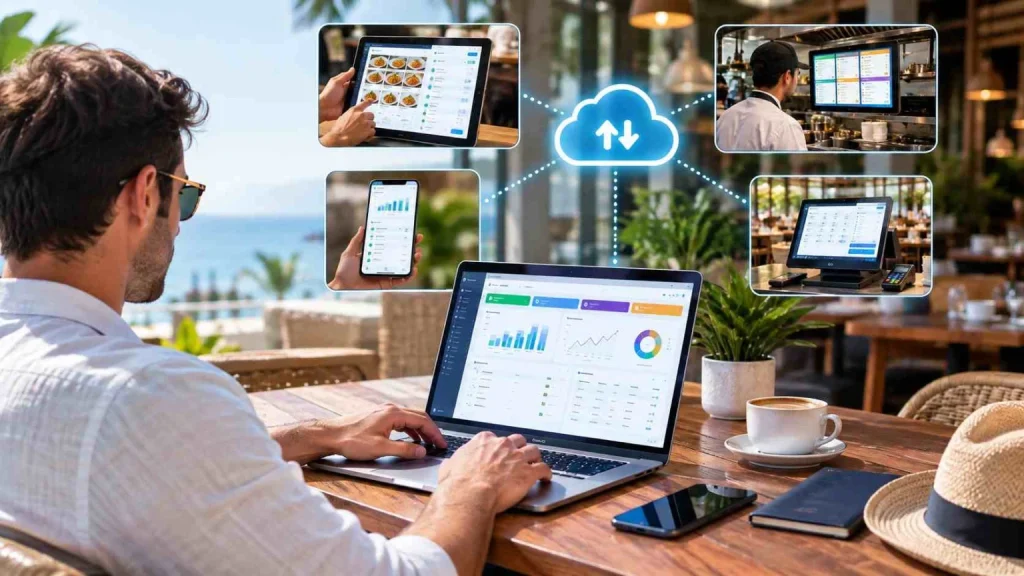
Yes, largely. A cloud POS lets you see live sales, change prices and menus, approve discounts, monitor stock, and compare branches from any internet-connected device. What it does not do is replace a person on the floor. Service recovery, equipment failures, staff conflict, and food quality still need someone physically present.
Wondering if you can run your restaurant while you’re on vacation? For many people, running a business is a full-time job, which makes it hard to go on vacation. But did you know you can make things easier for you and your restaurant? You can run your business from anywhere; Cloud POS lets you do this!
Modern restaurant owners face a critical challenge: maintaining operational control while achieving work-life balance. Traditional point-of-sale systems tie you to your physical location, but cloud-based POS technology has revolutionised how restaurants operate in 2026.
What is Cloud-Based POS and How Does It Work?
A point-of-sale (POS) system is essential software that cashiers use to process transactions when customers purchase goods from your business. Cloud-based POS software represents a significant evolution from traditional cash registers, storing all your data securely in the cloud rather than on local servers or hardware.
This means you can access your entire restaurant management system from any internet-connected device, whether you’re at home, on vacation, or attending a business conference. The cloud infrastructure ensures real-time synchronization across all your devices and locations.
The word “cloud” is used loosely by vendors, so it helps to be precise about what actually enables remote access. It includes on-demand self-service and broad network access, meaning the service is reachable over the network from standard devices. That second characteristic is the one doing the work here. It is why your phone can see the same live data as the terminal at your counter. A system that merely backs up to the internet overnight cannot do this, because the software still runs on a machine in your restaurant. Ask any vendor where the software itself runs, not just where the backups go. Our guide on how cloud POS systems actually work walks through the full order and payment flow.
Run Your Business from Anywhere: Cloud POS Benefits and Features
Here are the top reasons that will make you think of getting a cloud POS system for your restaurant today!
1. Easy Configuration and Setup
Quick to set up and customize to your restaurant’s unique specifications, cloud-based point-of-sale (POS) systems are a breeze to use. Consequently, setting up a Cloud POS system is far quicker than installing and implementing a traditional POS system.
There’s nothing simpler than selecting the download option on an iPad and getting going right away! This is a great method for companies and restaurant chains to open multiple locations quickly and hassle-free.
Unlike legacy systems that required weeks of installation and employee training, modern cloud POS platforms are intuitive and user-friendly. With just a few hours of training, your staff members will be familiar with and able to adjust to your cutting-edge point-of-sale system.
2. Offer Better Customer Experience
Restaurants can also expedite several tasks by automating procedures with a cloud-based point-of-sale (POS) system. These duties include order management, payment processing, inventory monitoring, sales and customer analytics, loyalty programs, and more
These automated processes help create a better dining experience for customers by reducing wait times and making restaurant operations easier to manage. This is great for all sorts of restaurants, from table service to fast food, since it allows your staff to concentrate more on the client and upselling instead of spending time on repetitive, low-skill work.
The speed at which in-store service is provided is among the easiest things to enhance with today’s technology. Customers using traditional cash registers have to wait while the cashier inputs each item’s purchase details one at a time into the machine. But with a modern point-of-sale system, information may be entered much more quickly.
Meeting the demands of consumers is another crucial aspect of the customer experience. Would the client desire an email copy of their invoice, for instance? An effective point-of-sale system has this attribute. When it comes time to ask for a refund or an exchange, the consumer won’t have to keep track of another receipt, something they frequently can’t find.
3. Run Your Business from Anywhere: Cloud POS and Expand Business
With the extremely scalable solution provided by cloud-based POS systems, restaurants can effortlessly scale their operations as their business expands. As your restaurant’s demands change, you may add new features and capabilities using cloud-based point-of-sale (POS) systems.
Small businesses, as well as larger companies or franchises, depend on this scalability since they must be able to make swift adjustments to remain competitive. For multi-location retail or restaurant operations, you can manage all locations from a single dashboard without needing to recruit additional managers for each franchise.
4. Improved Operational Remote Control
Even if running a retail store or restaurant requires full-time work, you have time for vacations! This means that occasionally you won’t be able to ensure everything goes according to plan because you won’t be available.
When you’re not around, have you noticed how easily things spiral out of control? You might have to deal with a crisis that emerged while you were away from the scene of affairs, even in the middle of a vacation.
With cloud-based POS, you can monitor operations, adjust pricing, approve discounts, and respond to issues in real-time from your smartphone or tablet. You may have observed that goals and targets aren’t reached and that worker productivity may decrease when you’re away, but cloud technology solves this challenge.
5. Increased Mobility and Flexibility
Point-of-sale (POS) software not only streamlines sales and inventory management, but it can also be combined with internet-connected mobile devices, such as Windows tablets, and deployed on various workstations.
You and your team will benefit from this option as well as your customers, since it allows you to access your data, generate invoices, and prepare orders even when you are taking part in a special event.
For instance, you don’t have to go back inside to create the invoice and collect payment at a sidewalk sale put on by your neighbourhood restaurant or retail association. Attending a convention or trade show also lets you take advantage of the same benefits. To access all of your data, bring your laptop or tablet and sign in.
6. Customizable and Modular Design
Restaurants may link additional modules under a unified system with cloud-based point-of-sale (POS) systems. This implies that you won’t need to shell out a lot of money for expensive hardware packages or software licenses because you can design a solution specifically matched to your restaurant’s requirements.
Restaurants may connect current third-party services, including loyalty programs and customer relationship management (CRM) systems, with a Cloud POS system because of its flexible approach. The modular design of a cloud-based point-of-sale (POS) system makes it simple to manage all of your company’s requirements on a single, recognizable interface.
7. Less Hardware Required
You may need only a small amount of reasonably priced hardware to operate your restaurant’s complete operation with a cloud POS system. Comprehensive point-of-sale functions are now built into mobile devices (like affordable Android phones) or tablets (like iPads), meaning that all information is stored in the Cloud instead of on a local server.
This removes the need for pricey hardware, enabling you to use simple, inexpensive devices to access your restaurant’s point-of-sale system and all of its fantastic benefits. Other than tablets and alternative mobile devices, the technology used in restaurants is entirely dependent on their specific requirements. However, if you so desire, you could operate your whole restaurant on a single iPad.
Furthermore, the cost of buying equipment for a traditional restaurant or retail management system can be high. You would be in charge of handling upgrades, backups, and security issues. You will also need to buy all the hardware required for the server and cash registers. But by using a cloud-based POS system, the project turns a profit very rapidly.
8. More Secure and Lower Risks
In some aspects, cloud-based point-of-sale (POS) systems surpass conventional POS systems in terms of security. Cloud POS systems offer automatic security upgrades. They also provide restaurants with features like user authentication. This restricts access to your data and puts the controls in your hands.
You can simply remove access for any user at any moment and monitor who has access to what parts of your system. Effectively controlling employee access and roles inside the POS system can also assist in lowering risk.
Additionally, if you have opted for cloud-based point-of-sale software, you can be confident that your data is secure because stringent security measures have been implemented to guarantee IT system management. A complete and automatic periodic backup on one or more remote servers is guaranteed by cloud technology.
Another significant feature of cloud POS systems is in-depth analytics. These let you keep tabs on consumer behaviour, sales patterns, and other details to identify any strange deviations. Lastly, you don’t have to worry about your on-site servers becoming destroyed or corrupted and losing all of your company data because everything is saved in the cloud.
Remote access does add one responsibility that an on-premises system never had: every device you log in from becomes a way into your business data. Three settings are worth getting right before you start managing from your phone. Turn on two-factor authentication for every account with admin rights. Give managers role-based access rather than sharing one owner login, so you can see who changed what. And remove access the same day someone leaves, not at the end of the month. None of this is difficult, and all of it is easier to set up now than to retrofit after something goes wrong.
9. Data Access in Real-Time and Easy-to-Access Reports
Cloud point-of-sale (POS) systems offer real-time access to data for restaurant managers and other relevant people. This system gives access to data to everyone who needs it. This way, you don’t have to worry about waiting for reports to be generated or about manually transferring data between devices.
You are forced to rely solely on your emotions in the absence of sufficient knowledge about the state of your company, which limits your ability to make wise choices all the time. Having access to lucid, all-inclusive data and statistics regarding your operations is crucial for this reason.
With just a few clicks, the POS system may produce dependable, accurate reports that are readily accessible. By doing so, you can adjust your reordering schedule in response to notifications when a particular product is running low in stock or selling out too quickly. Additionally, remember that you can get this data from any location because of cloud-based technologies.
You may use this tool to spot sales trends and come to informed business judgments. As there would be no need to manually gather and prepare reports, this would save you and your staff a great deal of time.
10. Remote Management and Instant Updates
Business managers may change menus, pricing, modifiers, discounts, combinations, and much more from their smart devices with cloud-based point-of-sale (POS) systems. You may avoid having to manually update every piece of restaurant technology you own one by one by having all changes instantly sync across all pertinent modules and devices.
The opportunities for ongoing development are provided by the regular and automatic upgrades that are included. The software vendor assumes much of the IT management, and the initial expenditure is negligible.
11. Lowering Expenses and Increased Efficiency
When selecting point-of-sale (POS) software, a retail business’s profitability and control over expenses are critical considerations from a financial standpoint.
For instance, if you decide not to utilize a point-of-sale (POS) system to run your firm, it becomes challenging to monitor spending and day-to-day operations. This would include bringing on extra staff to manage inventory and meticulously record every transaction that occurs within your company.
By putting the proper resources in the right places and utilizing employee skills to help them become more productive, businesses can try to steer clear of these problems. Compared to conventional cash registers, point-of-sale software streamlines operations.
Reducing operational expenses will become a reality, and inventory management will be easier with this technology in place. The most crucial thing to keep in mind, though, is that efficiency raises performance and production, which in turn raises earnings.
Put differently, a restaurant or retail enterprise seeking to enhance its profitability ought to consider including a robust point-of-sale system in its operations.
Cost control only becomes real when the POS data reaches your books rather than staying in a dashboard. Sales, discounts, voids and ingredient consumption should flow into your restaurant back office and accounting system automatically, so food cost percentage and margin are calculated from what actually happened rather than from a month-end reconstruction. This matters more when you are managing remotely, because a monthly figure you cannot interrogate is not much use from another city. Ask any vendor how their reporting connects to your accounting, and whether the link is native or something someone has to export and re-import every month.
What Remote Management Actually Looks Like Day to Day
The eleven benefits above describe what the technology makes possible. They do not describe what you would actually do on a Tuesday while sitting somewhere else, which is the question the title of this article promises to answer.
Here is a practical routine that works for most owners away from the floor.
Check three numbers each morning, not the whole dashboard. Yesterday’s total sales against the same day last week, average transaction value, and void or discount count. Two minutes. Sales tell you volume, average transaction tells you whether upselling is happening, and voids tell you whether something odd is going on at the till. Opening the full dashboard every day is how people stop opening it at all by week three.
Set alerts instead of watching. Most systems will notify you when a threshold is crossed. Useful ones: a discount above a set percentage, a void after payment, stock falling below par on a high-volume ingredient, and sales tracking materially below the same period last week. Alerts turn monitoring into an exception process, which is the only version that survives a real holiday.
Do one weekly review properly. Half an hour once a week beats ten minutes daily. Look at menu item performance, food cost variance, prep times if you track them, and branch comparison if you run more than one site. This is where you actually catch things.
Decide in advance what your manager can approve without you. Write it down: a refund up to a certain value, a comped dish, a shift swap, an emergency purchase up to a limit. Ambiguity is what generates the holiday phone calls, not the absence of software.
Agree on one escalation channel. Not four. If your team can reach you on WhatsApp, by phone, and by email, they will use whichever is quickest for them, and you will miss things. One channel, checked at agreed times.
Actionable tip: before your first real trip, do a dry run. Manage remotely for three days while you are still in the city and can walk in if needed. You will find the gaps in permissions and alerts without any of the consequences.
What You Still Cannot Do Remotely
Every article on this topic answers “can you run your restaurant from anywhere?” with an unqualified yes. The honest answer is “most of it, and here is the part that still needs a person”, which is more useful to someone actually planning a trip.
Service recovery. A table that has had a bad experience needs a manager at the table, not a discount approved from a phone. The software can authorise the comp. It cannot apologise.
Equipment failure. A dead fridge, a failed extraction fan, a fryer that stops holding temperature. Your POS will show you the sales gap that follows. It will not tell you the compressor went at 4 pm, and it certainly cannot call an engineer.
Staff conflict and morale. The things that actually determine whether your Friday night runs well are mostly interpersonal, and they are invisible in a dashboard. A shift where two senior staff are not speaking to each other looks identical to a good shift in the sales report.
Food quality and consistency. No system tastes the food. Portion drift, a new cook plating differently, a supplier quietly changing a product: these surface in customer reviews and in your food cost variance weeks later, not in real time.
Anything requiring physical presence with your team. Training, onboarding, and the informal knowledge transfer that happens in a kitchen cannot be done through a screen.
The practical conclusion is not that remote management fails. It is that remote management works when you have a capable person on site and the software gives you visibility into their decisions. Cloud POS removes the need to be present for information. It does not remove the need for someone to be present for judgment.
That distinction matters more when margins are tight. A report has found that 42 percent of operators said their restaurants were not profitable in 2025, with the association pointing to operational innovation and technology as levers for easing cost pressure. Visibility helps you act sooner. It does not act for you.
If your kitchen is the part you worry about most while away, that is usually a routing and visibility problem rather than a supervision problem. A connected kitchen management system gives you prep times and ticket history you can review remotely, which is the closest thing to standing at the pass.
Why Cloud POS is Essential in 2026
Consumer behavior is always evolving. The differences between millennials’ demands and those of previous generations make this clear. Businesses need to understand how to use technology if they want to be liked by all and gain their loyalty.
Restaurants using cloud-based POS systems report 30% higher operational efficiency and a 25% improvement in customer satisfaction scores compared to traditional systems. This data underscores why cloud technology has become the industry standard.
Conclusion
Now you know you can run your business from anywhere; a cloud POS system enables you to manage everything through an internet-connected device. You also know the benefits of getting a cloud-based POS system for your restaurant and the reasons you should have one.
Integrating cloud-based point-of-sale software with your daily operations has become a must for any business. Managing a business is made considerably easier by the technological advancements of these systems in recent years.
Why are you waiting? Stay ahead of your competitors and optimize your restaurant operations by switching to a cloud-based POS system today! Choose CherryBerry RMS today!
Key Takeaways
- Cloud POS removes the need to be physically present for information: live sales, stock levels, menu changes, and branch comparison are all available from any device.
- It does not remove the need for someone present for judgement: service recovery, equipment failures, staff issues, and food quality still need a person on site.
- Check three numbers daily rather than the whole dashboard, and do one proper review weekly.
- Set alerts so monitoring becomes an exception process, which is the only version that survives an actual holiday.
- Write down what your manager can approve without you. Ambiguity generates holiday phone calls, not missing software.
- Turn on two-factor authentication and role-based access before you start managing remotely, not after.
- Do a three-day dry run while still in the city before relying on remote management for a real trip.
Frequently Asked Questions (FAQs) About Cloud POS
What is a Cloud-Based POS System?
A cloud-based POS system stores your business data online instead of on local computers. It allows you to manage sales, inventory, and customers anytime from any device using an internet connection.
How Does a Cloud POS Work?
Cloud POS connects your billing counter, kitchen, and backend through secure online servers. Every transaction updates in real time, so you can track performance, sales, and inventory instantly, even from your phone.
Why Is POS Software Important for Businesses?
A POS system automates daily operations like order management, sales tracking, and stock control. It also enables you to run your business from anywhere; cloud POS allows you to manage your operations remotely. It reduces human errors, saves time, and provides real-time insights that help business owners make smarter decisions.
How Can POS Solutions Benefit Small Businesses?
Cloud POS software helps small businesses minimize costs, reduce manual work, and improve order accuracy. It also integrates with delivery platforms and digital payments to simplify operations and grow profits.
Which Is the Best Cloud POS System for Restaurants or Retail?
CherryBerry RMS is a leading choice with FBR integration, PKR billing, and 24/7 support. It’s designed for every restaurant and retail need at affordable pricing.
How Can I Get a POS System for My Business?
You can get started by booking a consultation with a trusted provider like CherryBerry RMS. Their team will help set up your POS, train your staff, and customize features to match your business workflow.
Can I really manage a restaurant remotely, or only monitor it?
You can genuinely manage a lot: change prices and menus, approve discounts and refunds, adjust stock levels, compare branches, and review staff performance. What you cannot do remotely is handle anything requiring physical presence, including service recovery at a table, equipment failures, staff conflict, and food quality checks.
What should I check each day when I am away from my restaurant?
Three numbers, not the full dashboard: yesterday’s sales against the same day last week, average transaction value, and void or discount count. Then set alerts for exceptions such as unusually large discounts, voids after payment, and stock below par. Do one proper thirty-minute review weekly rather than a long check daily.
Is it safe to access my POS from a personal phone?
It is, provided you set it up properly. Turn on two-factor authentication for any account with admin rights, use role-based access rather than sharing one owner login, and remove access the same day someone leaves. Avoid staying logged in on shared or public devices.
What happens if the internet drops while I am managing remotely?
Two separate things can drop: your connection or the restaurant’s. If yours drops, the restaurant carries on normally, and you simply lose visibility until you reconnect. If the restaurant’s connection drops, behaviour depends on the vendor, so ask specifically what happens to live orders and card payments, and keep a backup connection with a UPS on the router at the restaurant.