

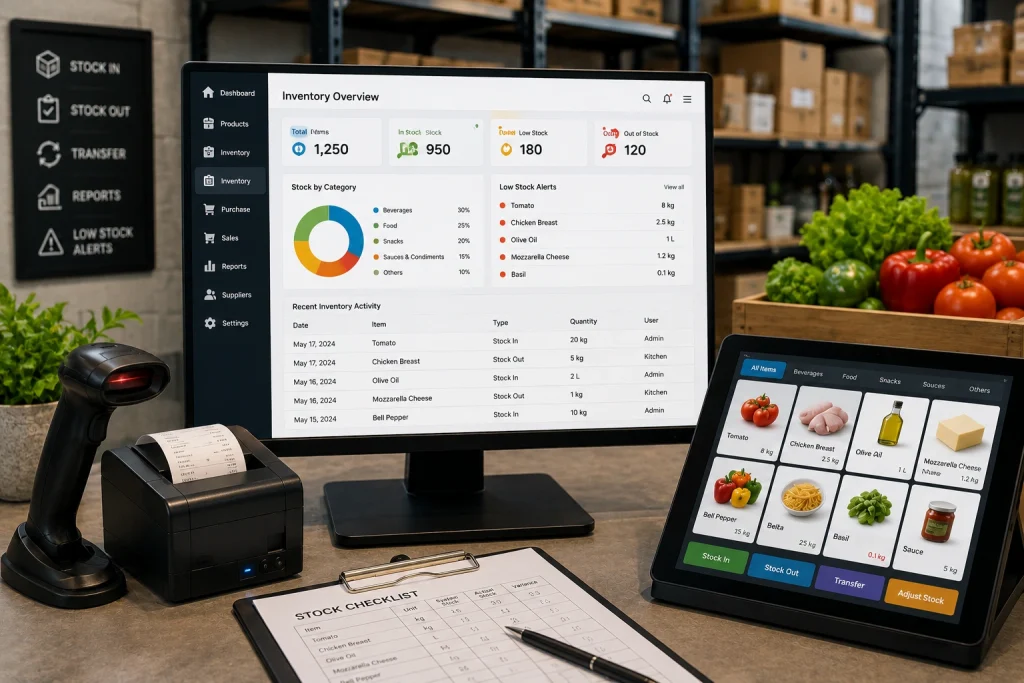
POS inventory management links every sale to your stock records. When a dish sells, the system deducts each ingredient automatically. You get live stock levels, low-stock alerts, and early warnings about waste. Restaurants, cafés, fast-food outlets, bakeries, and retail stores use it to stop over-ordering and protect thin margins.
You run out of chicken at 8 pm on a Friday. Or you open the walk-in and find three cases of sauce that expired last week. Sound familiar?
Most restaurants don’t have a stock problem. They have a visibility problem. Nobody knows what sits on the shelf until it’s too late.
POS inventory management closes that gap. A connected system tracks every ingredient, sale, and reorder from the screen your cashier already uses. If you already run a cloud-based restaurant POS, inventory control is the natural next step.
This guide explains how it works and what missing stock control costs you. It also covers cafés, fast food, desi restaurants, medical stores, and retail shops. You will see how the big competitors compare, what pricing depends on, and how to set the system up in 30 days.
A quick note on terms. You will see this idea called POS inventory management software, a POS system with inventory management, or an inventory management POS. They all point to the same thing. Don’t get stuck on the wording when you compare providers.
Key Takeaways
- Food costs take roughly 28–35% of restaurant sales, so small leaks matter.
- A POS inventory system deducts ingredients automatically with every sale.
- Recipe-based tracking is the feature that separates restaurant tools from retail tools.
- Compare actual usage against theoretical usage to catch waste and theft.
- A phased 30-day rollout avoids disruption during service.
What Is POS Inventory Management?
POS inventory management means your point-of-sale system and your stock records talk to each other. When a dish sells, the system deducts its ingredients. Nobody updates a spreadsheet after close.
Old-school stock counts happen weekly, on paper, after the damage is done. A connected setup works differently. It updates stock the moment staff ring up, cancel, or comp an order.
Once you set it up, the system tracks these items automatically:
- Stock levels for every raw ingredient and finished item
- Ingredient-level usage tied to each recipe on your menu
- Low-stock alerts before you run out mid-shift
- Purchase orders that go out when stock hits a set threshold
- Stock adjustments for waste, spoilage, staff meals, or comped items
What Is the Difference Between POS and Standalone Inventory Software?
Owners ask this question a lot, so here is a direct answer. Standalone inventory software runs apart from your billing. Someone must enter every sale, waste log, and purchase by hand. Then they reconcile it against the register at night.
A POS with built-in inventory management works inside the platform you already use to take orders. There is no second login and no re-typing. The stock count always matches what actually sold.
- Standalone software: manual entry, delayed updates, separate login, reconciled after the fact
- POS-integrated inventory: automatic deduction, real-time sync, one dashboard, no double entry
Many owners also run accounting and purchasing in a separate tool. A restaurant back office system that handles inventory, accounting, and procurement removes one more spreadsheet from the pile. It doesn’t add a third tool to reconcile.
Why POS Inventory Management Matters: The Numbers
Food waste isn’t a minor line item. It drains margins every single day.
The U.S. National Restaurant Association estimates that restaurants generate about 11.4 million tons of food waste a year. That waste costs the industry roughly $25 billion. Much of it traces back to one cause: nobody knew what was in stock, so ordering and prep ran on guesswork.
Margins make it worse. Food costs eat about 33 cents of every sales dollar. Average restaurant profit sits at a thin 3–5%.
ReFED, a U.S. food-waste nonprofit, puts food cost at 28–35% of sales. It also reports that pre-consumer waste (spoilage, trim, and overproduction) typically runs 4–10% of food purchased.
Here is what that means in practice. Waste 8% of your purchases at a 30% food cost, and you burn about 2.4% of revenue. That can swallow most of a typical restaurant’s pre-tax profit.
The upside is real. ReFED’s analysis suggests waste tracking and analytics can cut pre-consumer waste by up to half in contract foodservice. Results vary by kitchen, but the direction is clear. What you measure, you can reduce.
A Realistic Example: A Biryani and Karahi Restaurant in Lahore
Consider a 60-seat desi restaurant with monthly sales of Rs 4,000,000. At a 35% food cost, it spends about Rs 1,400,000 on ingredients each month. This example is illustrative, so use your own numbers.
Suppose 6% of those purchases get wasted through over-prepped rice, spoiled yogurt, and untracked trim. That equals Rs 84,000 a month. If live stock data helps the manager cut that waste by a third, the restaurant saves about Rs 28,000 a month. Over a year, that adds up to roughly Rs 336,000.
The savings come from better ordering and prep, not from cutting quality.
The Hidden Labour Cost
Manual counting also costs time. A manager with a clipboard isn’t training staff, checking the dining room, or reviewing this week’s numbers. Automated real-time tracking handles that work in the background.
How a POS Inventory System Works, Step by Step
Here is what happens behind the scenes once everything connects properly.
Step 1: Map Every Menu Item to Its Ingredients
Someone links each recipe to its ingredients first. A burger maps to its bun, patty, and sauce. A cocktail maps to its spirits and garnish. Every later step depends on this foundation.
Step 2: Stock Deducts at the Point of Sale
When staff bill a dish, the system reduces each ingredient by the exact quantity used. Cancel an order, and the deduction reverses. Comp a meal, and it still counts as used stock.
Step 3: Low Stock Triggers an Alert
You set reorder points for each item. The system flags anything near a shortage long before a server tells a table, “We’re out of that today.”
Step 4: Purchase Orders Go Out Without a Phone Call
Many systems support automatic reordering. They generate a purchase order for your usual supplier once stock crosses a threshold. Paired with vendor management tools, this cuts a lot of admin work.
Step 5: Waste and Shrinkage Get Logged
Spoilage, breakage, and theft all count as shrinkage. Staff log each event with a reason code. It then shows up in reports instead of vanishing into “unexplained variance.”
Step 6: Reports Show What Is Really Happening
At week’s end, you read a report instead of counting shelves. Inventory valuation and cost of goods sold (COGS) show where your money went. Forecasting helps you order smarter next time.
Connect this to the kitchen for even better results. A kitchen management system sends orders to the line and keeps prep aligned with real demand. That cuts overproduction, the biggest source of pre-consumer waste.
Who Needs POS Inventory Management?
Every food business loses money to blind spots. The type of loss differs by business, so here is how it plays out.
Full-Service Restaurants
Menus here carry dozens of ingredients and many modifiers. Recipe-level tracking shows which dishes earn money and which quietly lose it.
Cafés and Bakeries
Cafés run on milk, coffee beans, and pastries with short shelf lives. Daily par levels and low-stock alerts prevent both stockouts and spoilage.
Fast Food and Quick-Service Restaurants
Speed and volume define QSR. Small portion errors repeat hundreds of times a day. Automatic deduction exposes over-portioning fast.
Desi Restaurants and BBQ Spots
Karahi, biryani, tandoor, and BBQ kitchens cook in bulk. Raw weight and cooked yield differ, and marination loses weight. Track raw ingredients, set yields per recipe, and log leftovers at close. That keeps your food cost honest.
Cloud Kitchens and Multi-Branch Chains
Multi-location owners need one view of every branch. Centralized stock, branch transfers, and consolidated reports replace phone calls and WhatsApp counts.
Medical Stores and Retail Shops
Pharmacies, grocery stores, and retail shops share the core need: know what you hold and what sells. They also face different rules. Medical stores must track batches and expiry dates. Retail shops need barcode and SKU control. Before you buy, confirm that the system supports the exact tracking your business needs.
Core Features Every POS Inventory System Should Have
Not every system covers the basics well. These features move the needle:
- Real-time inventory tracking: Updates happen the moment staff ring up a sale, not in a nightly batch.
- Ingredient-level, recipe-based tracking: SKU-level counts borrowed from retail aren’t enough.
- Low-stock alerts and automatic reordering: Nobody should babysit stock levels between shifts.
- Barcode scanning and SKU management: Deliveries and audits go faster and stay accurate.
- Multi-location inventory: Look for branch-level stock and transfers between outlets.
- Vendor and purchase order management: Built in, not bolted on.
- Inventory valuation and food cost reports: Break them down by menu item, not just total spend.
- Integration with your KDS, accounting, and online orders: Front-of-house, kitchen, and delivery data stay in sync.
- Local compliance support: In Pakistan, ask whether the POS supports FBR-compliant invoicing.
A long feature list doesn’t guarantee a smooth experience. Ask for a live demo. Watch someone ring up a sale, cancel it, and check whether the stock count updates at once. That ten-minute test beats any spec sheet.
Key Inventory Metrics Every Owner Should Track
Good software gives you numbers. Good owners act on them. Start with these five.
| Metric | Formula | What it tells you |
|---|---|---|
| Food cost % | (Opening stock + purchases − closing stock) ÷ sales × 100 | How much of each sale goes to ingredients |
| Actual vs. theoretical usage | Actual usage − usage your recipes predict | Hidden waste, theft, or portion drift |
| Waste % | Logged waste value ÷ purchases × 100 | How much you throw away |
| Inventory turnover | COGS ÷ average inventory value | How fast stock moves before it spoils |
| Stockout rate | Items unavailable ÷ items on menu | Lost sales from running out |
Review these weekly, not yearly. A single item with a large variance often points to one fixable cause, such as a wrong recipe or a careless shift.
Restaurant Inventory vs. Retail Inventory
A lot of confusion starts here. Retail-focused platforms such as Square and Lightspeed Retail track finished, sellable products well. A T-shirt, a candle, or a six-pack is one item.
A restaurant sells a combination of ingredients, cooked, plated, and often modified. A burger sold isn’t one deduction. It is five or six at once, in different units and costs.
That is why restaurant tools need recipe-based tracking. When you evaluate any platform, ask one question first. Does it understand recipes, or does it just count finished items like a retail shelf?
How Popular POS Inventory Tools Compare
Restaurant owners usually choose between three types of tools. Pricing and features change often, so verify details on each vendor’s website before you decide.
| Tool type | Examples | Typical strength | Typical trade-off |
|---|---|---|---|
| POS with built-in inventory | Toast, Lightspeed Restaurant, TouchBistro, CherryBerry RMS | One system for sales and stock, with no double entry | Depth varies by plan and vendor |
| Inventory and food-cost specialists | MarketMan, MarginEdge | Strong purchasing, invoice processing, and recipe costing | A separate tool to connect to your POS |
| Restaurant accounting and operations suites | Restaurant365 | Inventory tied closely to accounting | Often suits larger or multi-unit operators |
| General retail POS | Square, Clover | Simple setup, good for finished goods | May lack deep ingredient-level tracking |
The pattern is clear. Specialists go deep on purchasing and costing. POS-integrated systems win on simplicity and real-time sync. Choose based on whether you want one connected platform or a best-of-breed stack.
What Does POS Inventory Management Cost?
Prices vary widely, so no honest article can give one number. These factors drive the cost:
- Number of outlets and registers
- Plan tier (basic stock counts vs. recipe costing, purchasing, and multi-location sync)
- Hardware needs, such as terminals, printers, and barcode scanners
- Setup, menu import, and staff training
- Add-ons such as accounting, online ordering, or delivery integrations
Compare what the base plan includes against what sits behind an upgrade. Then weigh the price against your waste. In the Lahore example above, even a modest cut in waste covers a lot of software cost.
Small restaurants and cafés can start with core tracking and add features as they grow. Ask each provider for a written quote that lists every module.
How to Roll Out POS Inventory Management in 30 Days
A phased rollout keeps service running. Here is a simple plan.
- Week 1: Build your ingredient list, units, and recipes. Start with your top 20 best-selling dishes.
- Week 2: Add suppliers, purchase prices, and par levels. Run a full opening stock count.
- Week 3: Run the new system alongside your manual count. Compare the two daily.
- Week 4: Fix mismatches, train every shift, and drop the manual process once numbers match.
Keep one person accountable for recipe accuracy. Wrong recipes produce wrong stock numbers, no matter how good the software is.
Common Mistakes Restaurants Make Without a Proper System
- Counting stock on a clipboard that is out of date by the next shift
- Skipping recipe mapping, so the POS can’t tell what a dish consumed
- Ignoring low-stock alerts until staff stop noticing them
- Placing every order by phone instead of using vendor management
- Never reading COGS reports to find menu items that lose money
- Skipping regular audits, so shrinkage goes unnoticed for months
Each mistake looks small. Together, they eat into margins that were already thin. Many owners only notice after they sit down and run the numbers.
How to Choose the Right POS Inventory Management System
Ask these honest questions before you commit to any provider:
- Does it handle recipes, not just products? Retail-first tools often miss ingredient detail.
- Are barcode scanning and vendor management included? Check pricing tiers carefully.
- Can it scale across locations? Confirm multi-location support before you expand.
- Does it fit your existing KDS, payments, and accounting? Avoid a rip-and-replace if your hardware still works.
- Will your staff actually use it? A clunky screen fails on a busy Friday night.
- Does it offer local support? Fast help in your city and time zone matters when service is running.
Conclusion: Stop Running Your Kitchen on Guesswork
Every missed alert, over-order, and unexplained shortage at 7 pm on a Saturday carries a cost. None of it is inevitable. It’s a visibility problem, and a connected POS inventory system gives you that visibility.
CherryBerry RMS brings POS, inventory, and kitchen operations into one place. You stop stitching together five tools just to learn what’s left in the walk-in. If you run a restaurant, café, fast-food outlet, or multi-branch brand, contact the CherryBerry team to see how it works with your menu.
FAQs About POS Inventory Management
What is POS inventory management?
POS inventory management connects your point-of-sale system to your stock records. The system tracks and deducts ingredients or products automatically as sales happen. Nobody counts manually after the fact.
How does inventory management work in a POS system?
Each menu item maps to its ingredients. When it sells, the system deducts those quantities instantly. It then triggers alerts or purchase orders once stock crosses a set level.
Can a POS system track ingredients, not just finished products?
Yes, if it supports recipe-based tracking. Retail-first POS tools often stop at finished-product SKUs. Confirm ingredient-level tracking before you buy.
What is the difference between a POS system and standalone inventory software?
Standalone software needs manual entry and runs apart from billing. POS inventory updates stock the moment a sale happens, with no double entry.
How much does a POS inventory system cost?
Cost depends on outlets, plan tier, hardware, and add-ons. Some platforms include basic inventory features at low cost. Purchase ordering, multi-location sync, and detailed COGS reporting often cost extra. Compare the base plan against the upgrades.
Can POS inventory management reduce food waste?
Yes. Real usage data helps you order closer to what you need. Regular audits catch shrinkage early. ReFED’s research shows waste tracking can cut pre-consumer waste significantly.
Does POS inventory management work for small restaurants and cafés?
Yes. Small outlets often gain the most because margins are tight and one owner handles many tasks. Start with core stock tracking and recipe mapping for your best sellers. Add purchasing and reporting later.
Does it work for multi-location restaurants?
Most modern systems support multi-location inventory. Owners can view stock, transfer items between branches, and pull consolidated reports from one dashboard.
Can medical stores and retail shops use POS inventory management?
Yes, they share the same core need: live stock levels and reorder alerts. However, medical stores need batch and expiry tracking, and retail shops need strong barcode and SKU control. Check that your chosen system supports those specific features.
How do I switch from manual counting without disrupting service?
Run a short overlap period. Keep the manual count as a backup for one or two weeks while you configure recipes item by item. Once both numbers match consistently, drop the manual process.
What is actual vs. theoretical food cost?
Theoretical cost is what your recipes say you should have used. Actual cost is what you really used, based on counts and purchases. The gap between them shows waste, theft, or portion errors.