


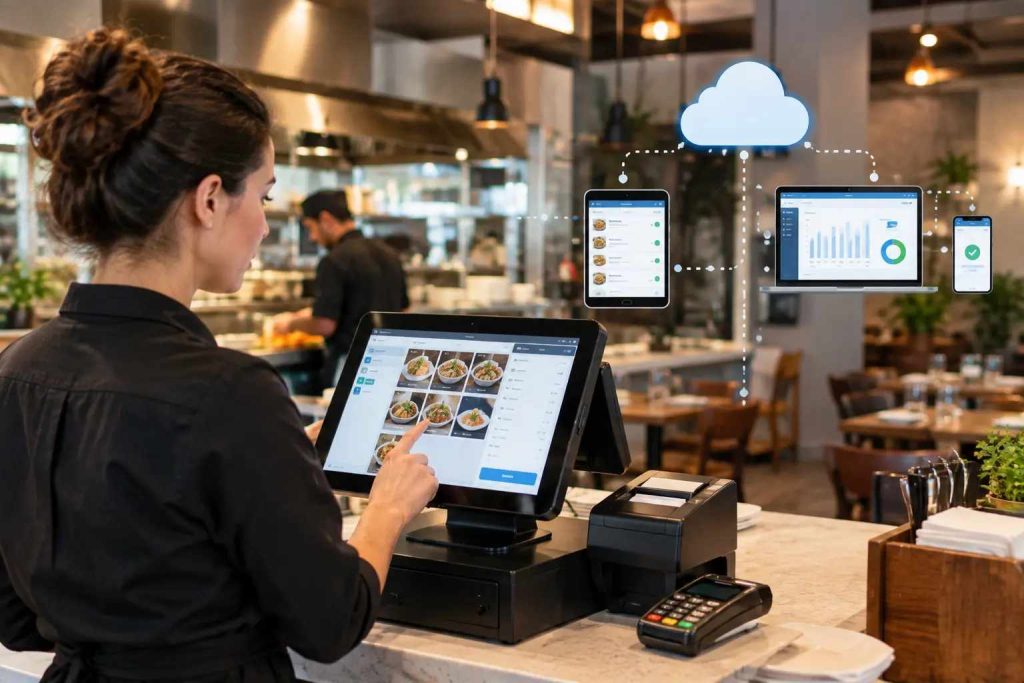
A cloud-based restaurant POS sends every sale over the internet to secure remote servers instead of saving it on one machine in your restaurant. Orders from any tablet reach the kitchen screen, the manager’s phone and the sales reports within seconds.
That is how cloud-based POS systems work in one line. Our complete guide to cloud-based restaurant POS systems covers the whole category. This article is more practical: it follows the problems restaurant owners in Pakistan bring us and shows how restaurant POS software solves each one, including in CherryBerry’s cloud-based POS for restaurants.
Still weighing it against a server-based setup? Start with our cloud POS vs traditional POS comparison.
Running a restaurant in Pakistan? Tax reporting changes the picture, so read our FBR POS invoicing guide alongside this one.
The shift is already happening. FBR’s published list shows 1,186 restaurants with 1,864 branches integrated with its POS system as of 30 September 2026.
What Is a Cloud-Based POS System for Restaurants?
A cloud-based point of sale (POS) is restaurant billing and order software that runs on remote servers and is used through tablets, phones or terminals. You subscribe to it as software as a service (SaaS) instead of installing a server in your back office.
NIST defines cloud computing around on-demand self-service, broad network access, resource pooling and rapid elasticity. For you, that means someone else runs the servers, you log in from any device, and capacity grows without new equipment.
Some vendors sell “restaurant billing software” that only prints bills. A restaurant POS goes further: it also handles orders, kitchen tickets, stock and tax reporting.
A system that only backs up overnight is a local system with an off-site copy, not a cloud POS. Ask where the software itself runs.
How Do Cloud-Based POS Systems Work, Step by Step?
Every order follows one loop: it is entered on a device, saved to the cloud, pushed to every screen that needs it and counted in your reports.
- Order entry. A waiter, cashier or customer enters the order on a tablet, terminal, QR menu or app.
- Cloud sync. The device sends it over your internet connection to the vendor’s servers.
- Distribution. The cloud sends a kitchen order ticket (KOT) to the kitchen display system (KDS) or printer, and updates the manager’s phone.
- Payment. Cash is recorded, and cards go through a payment processor.
- Reporting. Sales, item and staff figures update as the order closes.
Illustrative scenario: it is Friday, 8 p.m., and the chicken karahi runs out at the Gulberg branch in Lahore. The manager marks it sold out on his phone. The item disappears from every tablet, and from online ordering if it is connected, so no new orders arrive for a dish the kitchen cannot make.
Cloud POS vs Traditional POS at a Glance
Here is the short version. The comparison guide linked at the top has the full breakdown.
| Cloud POS | Traditional POS | |
|---|---|---|
| Where it runs | Remote servers you subscribe to | A server in your restaurant |
| Upfront cost | Low, with subscription pricing | High, for hardware and installation |
| Branch visibility | Live from any device | Call or visit each branch |
| Price and menu changes | Pushed once, live everywhere | Updated till by till |
| FBR and PRA reporting | Sent from the same POS record | Harder when billing data is stuck on one machine |
| Updates and backups | Automatic | Manual |
| Internet outage | Needs a fallback plan | Keeps running locally |
| Best for | Multi-branch, growing and cloud-kitchen businesses | A single outlet with unreliable internet |
How Does a Cloud POS Stop Missed and Wrong Orders?
The problem: a dine-in ticket, a phone order, a WhatsApp message and a foodpanda tablet all arrive in different places. Someone forgets to check one, and an order goes late or missing.
The fix: a cloud POS puts every channel into one queue and routes each ticket to the right kitchen station or printer.
Watch for shallow integrations. If delivery orders still land on a separate tablet, nothing has been fixed. Ask for a test order from every channel you use, then test routing with a dish that touches two stations, as many desi and continental dishes do.
In CherryBerry RMS, dine-in, takeaway, delivery, WhatsApp and phone orders land in the same queue and go straight to the kitchen display or ticket printer, and the ingredients used come off stock automatically.
How Can You Run Several Branches Without Visiting Each One?
The problem: checking three branches means calling three managers. A price change means visiting three tills.
The fix: every branch works from the same cloud record. You see sales live from your phone, and one price or promotion change goes live everywhere at once.
The same logic protects the till. Cashiers ring up sales, but only a manager should be able to void one.
Illustrative scenario: at 3 p.m. an owner opens the dashboard and sees one branch’s lunch sales far below the others. He calls the manager while the afternoon can still be saved, instead of finding out tomorrow.
For multi-branch restaurants, CherryBerry RMS gives you one dashboard for all outlets, reports by branch, item and hour, role-based permissions, and monitoring that tells you immediately when a branch goes offline.
How Does a Cloud POS Handle FBR and PRA Tax Invoicing?
The problem: owners keep asking the same thing. Must I connect my till to FBR or PRA, and what changes at the counter?
FBR’s POS integration FAQs say restaurants must integrate their POS with FBR’s system under Chapter XIV-A of the Sales Tax Rules, 2006. Punjab also runs its own system, the Punjab Revenue Authority’s electronic invoice monitoring system (eIMS).
PRA’s own POS component and eIMS manual says every sale and invoice is reported in real time, and PRA returns a fiscal invoice number for each one. Invoices that have not synced wait in the local database until they do.
Customers can check an FBR receipt themselves. In the Tax Asaan app, open “FBR POS”, tap “Verify Invoice” and scan the QR code or enter the invoice number. They can also text 9966 in the format INV, CNIC number, invoice number.
Ask any vendor which integrations it holds, whether a live invoice returns a number during the demo, and what happens to invoices raised offline. Which authority applies depends on how your outlet is registered, so confirm it with your tax adviser.
If your outlet falls under FBR’s integration rules, CherryBerry RMS creates the FBR invoice number and QR code at checkout and reports the sale as it happens. PRA and AJK reporting run from the same POS, so your cashier has no separate reporting step.
What Happens to Billing When the Internet Fails?
The problem: the connection drops on a Friday night and tickets pile up.
“Offline mode” means three very different things:
- Read-only: staff can see the order queue but cannot ring in new orders.
- Local queueing: new orders and cash sales are held on the device and pushed to the cloud when the connection returns.
- Full local operation: billing and kitchen routing keep running and reconcile later. Few systems do this well.
Cards are the catch, because approval needs a live line to the processor. Some systems store the transaction and forward it later, which moves the risk of a declined card onto you. Ask who absorbs that loss.
CherryBerry RMS handles brief drops with Zero Downtime Mode. Reopen the system on any connected device, keep billing, and the data syncs when the connection returns. Treat it as a fallback rather than a fully offline mode.
No software removes the need for a working connection. Put a UPS on the router, not just the terminal, and keep a mobile hotspot on a different network ready. Then test it in the demo, as the checklist below shows.
Who Is Responsible When a Customer Pays by Card?
Your POS never sees the real card number. A reader replaces it with a token, a payment processor asks the bank for approval, and funds settle later, usually overnight. That gap is why POS totals and bank balances differ on the same day.
POS uptime and payment uptime are separate, so one can fail while the other works. Ask three things:
- Who is the payment processor, and is it a separate contract?
- Does the kitchen ticket fire before or after approval?
- Who carries compliance under PCI DSS, the card industry’s security standard from the PCI Security Standards Council: you, the POS provider or the processor?
Why Does Food Cost on Screen Never Match the Shelf?
The problem: the report says one thing and your stock count says another.
The fix: link every sale to a recipe so ingredients come off stock automatically. Most mismatches come from setup, not software. Unmapped recipes, wrong unit conversions and missing yield percentages produce confident but wrong food-cost figures.
Ask for a recipe-mapping plan before go-live, and budget time for it. It decides whether your reports can be trusted.
What Can a Cloud POS Connect To?
A POS sits at the centre of a restaurant management system, so what it connects to matters as much as the billing screen. Look for these links:
- Kitchen: a kitchen display system and KOT printing.
- Ordering: online ordering, WhatsApp and phone orders.
- Delivery: rider assignment and tracking.
- Back office: inventory control and restaurant accounting.
- Call centre: orders taken by phone landing in the same queue.
CherryBerry RMS connects its cloud POS to its own kitchen management, order management, accounting, call-centre and rider app, so every part of the restaurant runs off the same data.
Which Restaurants Gain the Most From a Cloud POS?
- Multi-branch chains: one dashboard, one menu, one set of reports.
- Cloud kitchens: several brands can run from a single kitchen and dashboard.
- Quick-service restaurants and cafes: fewer taps per bill keep queues moving.
- Full-service restaurants: table management and billing stay in sync.
A single outlet with unreliable internet and no need for remote access may still be fine on a traditional system.
Cloud POS for Restaurants in Lahore and Across Pakistan
Restaurant software in Pakistan has to handle rules that generic guides ignore. FBR covers federal reporting, PRA covers Punjab, and CherryBerry RMS also supports AJK reporting for restaurants outside FBR’s federal scope.
CherryBerry RMS is built in Lahore, with our office in Gulberg II, so onboarding, training and support come from a local team. Whether you need a restaurant POS system in Lahore, elsewhere in Punjab or across Pakistan, one platform covers billing, kitchen, online ordering and tax reporting.
What Does a Cloud POS Cost, and How Do You Compare Quotes?
Cloud POS pricing is usually a subscription plus hardware and payment fees. Compare vendors on a 12-month total with the same line items:
- Subscription: per terminal or per branch.
- Hardware: can you use tablets and printers you already own?
- Payment fees: processing rates and settlement time.
- Onboarding and training: included or extra?
- Add-ons: online ordering, kitchen, accounting, rider app.
- Support: hours and response times, in writing.
CherryBerry RMS uses subscription pricing. Smaller restaurants and cafes can start on a basic plan and upgrade as they grow, and you can request a custom quote based on your outlets and modules.
How Do You Switch Without Disrupting Service?
An account and app can be running within hours. A proper migration takes longer.
Plan on roughly one to three weeks for a single location, depending on menu size.
Go live on a quiet weekday, not a weekend. Run the old system alongside the new one for a week or two until closing totals match.
CherryBerry RMS includes onboarding help and staff training, with 24/7 support for the features it provides.
Your Demo Checklist: What to Ask and What a Good Answer Looks Like
Use this table in every vendor demo, including ours.
| Ask the vendor to… | A good answer looks like |
|---|---|
| Show a live FBR or PRA invoice | The invoice number appears when the bill closes, and the QR code prints on the receipt |
| Unplug the router and take an order | Billing continues and syncs after reconnect, and the card limits are explained |
| Send a test order from every channel | Every order lands in one queue and reaches the kitchen screen |
| Change a price on a phone | Every branch shows the new price at the next order |
| Void a bill as a cashier | The system asks for a manager |
| Export your sales and customer data | There is a clear export route |
| Quote the 12-month cost | One quote covers subscription, hardware, payment fees and add-ons |
FAQs About Cloud-Based POS Systems for Restaurants
What is a cloud-based POS system for restaurants?
It is restaurant billing and order software hosted on remote servers and used through tablets, phones or terminals. Orders, payments, kitchen tickets and reports sync over the internet, so you do not run a server on site.
What is the difference between restaurant billing software and a POS system?
Billing software mainly prints bills. A restaurant POS also handles orders, kitchen tickets, stock, reports and tax invoicing, all from one system.
Does a cloud POS work without internet?
Most systems queue new orders on the device and sync them when the connection returns. Some only show a read-only queue, and few run fully offline. Card approvals still need a live connection, so ask which level you get.
Is FBR POS integration mandatory for restaurants?
FBR’s POS integration FAQs say restaurants must integrate under Chapter XIV-A of the Sales Tax Rules, 2006. Punjab also has PRA’s eIMS. Confirm your own position with your tax adviser.
What is the best cloud-based POS for restaurants in Pakistan?
The best one passes your own tests: FBR and PRA integration shown live, one queue for every channel, a fallback during outages and a clear 12-month cost. Run the demo checklist above, then ask CherryBerry RMS to run it on your own menu.
Is there a cloud POS in Lahore with FBR integration?
Yes. CherryBerry RMS is a Lahore-based cloud POS with FBR, PRA and AJK reporting. Book a demo to see a live invoice on your own menu.
How much does a cloud POS cost?
Pricing usually combines a subscription per terminal or branch, hardware you may already own and payment processing fees. Ask for a 12-month total, including add-ons, before comparing vendors.
What hardware do I need for a cloud POS?
A browser-based cloud POS runs on any internet-connected device, so you may already own what you need. Add a receipt or kitchen printer, a cash drawer and a card reader as needed, and confirm compatibility before you buy.
Can one cloud POS manage multiple branches?
Yes. Menus, prices, stock and reports sit in one system, so head office can change a price once and see every outlet’s sales together.
Is a cloud-based POS secure?
Card numbers are tokenised at the reader, so your POS does not store them. Role-based permissions limit who can void bills or see sensitive data. Ask who the payment processor is and who holds compliance responsibility.
Final Thoughts
A cloud POS earns its place when it fixes the problems that cost you money: lost orders, blind spots across branches, tax paperwork and Friday-night outages.
Want to see how that looks on your own menu and outlet count? Book a free CherryBerry RMS demo or request a custom quote.