


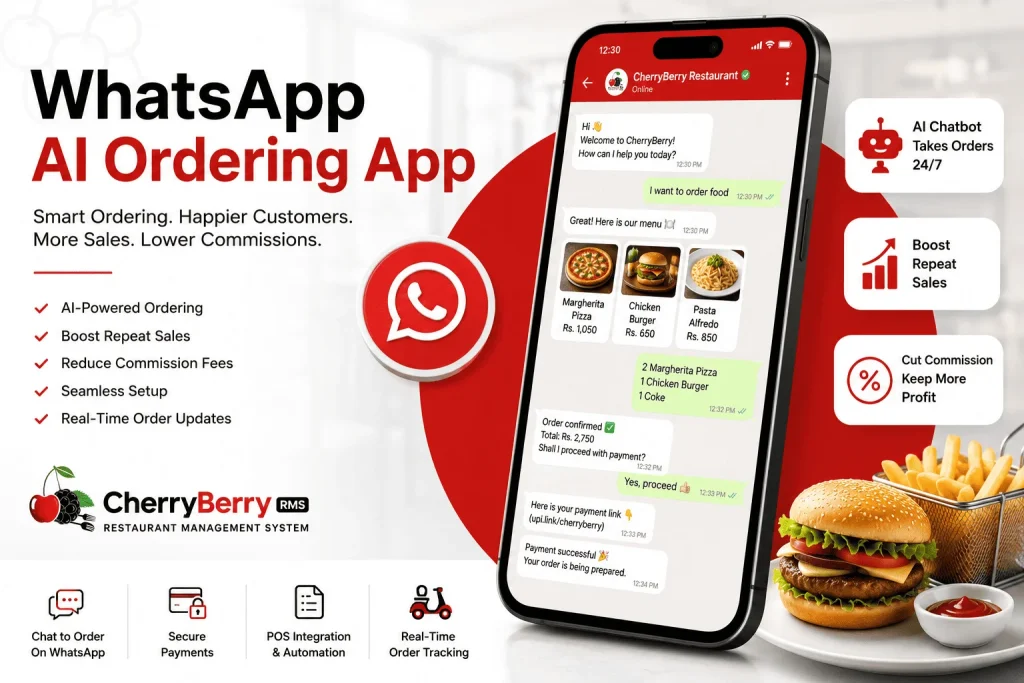
If you have ever tried to order dinner through a restaurant’s website on slow Wi-Fi, downloaded yet another app just to get 10% off, or sat on hold to place a takeaway order, you already know why food ordering has needed a redesign for years. That redesign is happening right now, and it’s happening inside the one app almost everyone already has open: WhatsApp.
A WhatsApp AI ordering app lets customers browse a menu, place an order, pay, and get updates, all within a chat thread they already use to talk to friends and family. No app download. No forgotten password. No clunky checkout page. Just a conversation that happens to end in food showing up at the door.
If you run a restaurant or a cloud kitchen, or you’re simply researching how to modernise order-taking without handing 20–30% of every sale to a delivery marketplace, this guide walks through exactly what a WhatsApp AI ordering system is, how it works, what to look for, and the real numbers behind why so many businesses are switching.
What Exactly Is a WhatsApp AI Ordering App?
At its core, a WhatsApp AI agent for restaurants is software that connects to the WhatsApp Business API, Meta’s official channel for business messaging. It uses artificial intelligence (AI), usually a WhatsApp chatbot built on conversational AI, to manage the entire ordering process automatically.
Think of it as three tools stitched into one thread:
- A digital menu, similar to a small Online Ordering storefront
- An AI chatbot that understands plain language so a customer can type ‘I will have 2 margherita pizzas and a Coke’ rather than tapping through category menus
- A backend with POS Integration so the order actually reaches the kitchen and the till
A general WhatsApp Business account needs a human to reply to every single message manually. Meanwhile, a real food ordering chatbot on WhatsApp runs on genuine restaurant AI logic. Sometimes it is built on models like ChatGPT to take orders, answer FAQs, confirm addresses, and send updates around the clock without a person typing every reply.
How Does It Actually Work?
Here’s the typical flow from a customer’s side:
- They message your WhatsApp Business number, often triggered by a “click to WhatsApp” ad, a QR code on the table, or a saved contact.
- The WhatsApp Business AI assistant greets them and shows the menu, sometimes as a catalog and sometimes as a simple text or button flow.
- The customer writes their order in their own words. Natural Language Processing (NLP) interprets what they mean, even with typos, slang, or a mix of languages.
- The bot confirms the order, applies any promo codes, and sends a secure payment link.
- Once paid, the order syncs straight into your restaurant POS or kitchen display. This is where order automation actually saves staff time.
- The customer gets automatic order tracking updates: preparing, out for delivery, and arriving in five minutes.
No app installs. No new login. Just chat, from browsing to delivery.
For one order followed from the first message to the kitchen ticket, see our AI WhatsApp chatbot for food ordering walkthrough.
Why Restaurants Are Switching to a WhatsApp AI Ordering App
The short answer is money and reach, while the longer answer has a few layers.
People Actually Read WhatsApp Messages
This is the part that surprises most owners the first time they see the data. According to research, WhatsApp messages achieve roughly 98% open rates and 45–60% click-through rates, compared with about 20% open and 2–5% click rates for email.
When order confirmations, delivery updates, and promos land somewhere with that kind of visibility, business automation actually works instead of quietly getting buried in a spam folder.
Customers Keep the Habit They Already Have
Customers are already texting on WhatsApp all day. Asking them to order is a much smaller ask than “Please download our app and create yet another account.
It Builds a Real CRM, Not a Rented One
Every conversation, order, and preference becomes data you own through a proper CRM, not data you’re renting attention from inside someone else’s marketplace app.
Support Scales Without Hiring More Staff
Customer support AI through the chatbot can answer, “Are you open?” “Do you deliver to my area?” or “Where’s my order?” instantly. This reduces missed calls and abandoned orders during a dinner rush.
Little to No Commission
Third-party food delivery apps typically take 15–30% of every order. A WhatsApp AI ordering app usually runs on a flat subscription or a small transaction fee instead; the order and the customer relationship stay yours.
Key Features to Look for in a WhatsApp Ordering System
Not every tool labelled “WhatsApp bot” is built the same way. Based on how the strongest platforms in this space are structured, here’s what separates a serious ordering assistant from a glorified auto-reply bot:
1. Real Natural Language Understanding
A good WhatsApp AI ordering system should understand messy, real-world messages like typos, slang, and voice notes, not just preset buttons. This is where Conversational AI makes the real difference between a frustrating bot and a genuinely helpful one.
2. Menu & Catalogue Management
You should be able to update prices, mark items as out of stock, and add daily specials in seconds without calling a developer.
3. POS Integration
POS integration means orders flow straight from WhatsApp into your billing system or kitchen display. This alone eliminates most manual order-entry errors.
4. Payment Support
Look for built-in payment links, UPI, or card checkout so customers can pay without leaving the chat.
5. Order Tracking & Notifications
Automated status updates (“your order is out for delivery”) reduce the “where’s my food?” messages that eat up staff time.
6. CRM & Customer History
A built-in CRM remembers repeat customers, their past orders, and preferences so the assistant can suggest reorders or personalised offers.
7. Multi-language Support
If your customer base is diverse, the assistant should be able to switch languages automatically based on how the customer writes.
8. Human Handover
Even the best AI assistant should know when to pass a tricky conversation to a real staff member.
What Does a WhatsApp AI Ordering App Cost, and Is It Worth It?
Pricing varies by provider, but most platforms in this category charge in one of two ways: a flat monthly subscription or a subscription plus a small per-message or per-order fee through the WhatsApp Business API. Either way, it’s usually a fraction of what a 20–30% delivery commission costs on the same order volume.
Businesses using WhatsApp chatbots have cut customer support costs by up to 30%, largely by automating repetitive questions that used to tie up a phone line or a staff member’s attention. The number tends to work out fairly simply for most restaurants:
- Lower commission per order compared to third-party delivery marketplaces
- Fewer missed calls during peak hours, because the AI Chatbot is answering routine questions instantly
- Higher repeat-order rates, since past customers are one saved contact away instead of one app-store search away
- Less staff time spent on manual order-taking, freeing people up for the kitchen or the floor
For a small café, the return might show up as a handful of saved staff hours per week. For a multi-location cloud kitchen brand, it can mean thousands of dollars a month in avoided commissions, which is exactly why restaurant automation has moved from nice-to-have to something operators actively budget for.
Getting Started: What Setup Actually Looks Like
Rolling out this kind of system isn’t as complicated as it might sound. Most providers manage the technical heavy lifting, but it helps to know the general process:
- Register a WhatsApp Business API number: this is usually done through the service provider, who serves as a Meta-verified partner on your behalf.
- Upload or build your digital menu: items, prices, modifiers, and photos so the AI chatbot has something accurate to work from.
- Connect your POS with the WhatsApp app: this step turns a chat conversation into an actual order in the kitchen.
- Train the AI assistant on your specific FAQs: delivery zones, opening hours, allergen questions, and anything customers ask you daily.
- Promote the number: table QR codes, Instagram bio links, receipt footers, and “click to WhatsApp” ads all funnel customers into the same chat.
- Watch the dashboard for the first couple of weeks, tweaking responses the bot handles awkwardly, before letting it run fully hands-off.
Most restaurants are fully live within a week or two. The biggest adjustment isn’t technical; it’s simply remembering to point customers toward WhatsApp instead of the phone.
WhatsApp Business API vs. the Regular WhatsApp Business App
This trips a lot of people up, so it’s worth clarifying. The free WhatsApp Business app, the one downloaded from an app store, is fine for one person manually replying to messages. It doesn’t support automation at scale, multiple agents, or deep integrations.
A genuine WhatsApp AI ordering app is built on the WhatsApp Business API and Meta’s official one. It has paid infrastructure for businesses that need automation, higher messaging volume, and integrations with a chatbot, CRM, or Point of Sale (POS) system. This is the layer that makes true AI ordering possible, and it’s what separates a hobby setup from something that can reliably run a restaurant’s order flow every night.
How to Choose the Right WhatsApp AI Ordering App
Here is a checklist to consider before you sign up for anything:
- Does it use real AI, or just fixed menus? Ask for a live demo and test it with a messy, natural sentence.
- Does it integrate with your point of sale (POS) or billing system? If not, you’ll end up doing double data entry.
- Is pricing transparent? Some platforms charge per order or per message on top of subscription fees; read the fine print.
- Can you customise the bot’s tone and menu without a developer?
- Does it offer analytics? You need information about your best-selling items and peak order times, not just to take orders.
- Is there human support when something breaks? Automation is great, but you need a real team behind the tool.
Who Actually Uses a WhatsApp AI Ordering App?
While restaurants are the most obvious use case, this technology has spread across the entire food and retail world:
- Independent restaurants and cafes replacing phone orders
- Cloud Kitchen operators who rely entirely on digital channels
- Cake shops, bakeries, and grocery stores taking pre-orders
- Food Delivery businesses managing multiple outlets from one number
- Salons, boutiques, and service businesses are adapting the same tech for bookings and digital ordering.
Basically, if a business takes repeat orders from the same customer base, there’s a strong case for smart ordering through WhatsApp.
Final Thoughts: Bringing It All Together
A WhatsApp AI ordering app isn’t about replacing the personal touch that makes a restaurant special. It’s about removing the friction that gets in the way of a restaurant’s success. Fewer missed calls, fewer wrong orders, faster service, and a channel your customers are already checking dozens of times a day.
If you’re a restaurant, cloud kitchen, or food business owner exploring how to bring WhatsApp automation, a smart restaurant chatbot, and real order management together in one place, that’s exactly the kind of digital transformation CherryBerry RMS is built for. It reflects a broader shift toward mobile commerce across the food industry, not a passing trend.
From AI customer service and POS integration to full mobile ordering and order tracking, our system helps restaurants set up a reliable, human-sounding WhatsApp AI ordering app without the technical headache so you can spend less time managing orders and more time running your restaurant.
Common Questions About Automated AI-Driven WhatsApp Orders
Do customers need to download anything?
No, that’s the whole point. If they have WhatsApp, they can order directly. It’s a big reason mobile ordering conversion tends to be higher through WhatsApp Commerce than through a standalone app that demands a download first.
Is a WhatsApp ordering bot allowed under Meta’s 2026 AI rules?
Yes. From 15 January 2026, Meta stopped general-purpose AI chatbots from running on the WhatsApp Business platform, but businesses using AI for their own customer service are not affected. A restaurant bot that takes orders and sends updates is still allowed.
How is this different from a chatbot on my website?
Reach. A website chatbot only talks to people already on your site. This kind of setup meets people where they already spend hours a day, and it can proactively send order updates and offers instead of just waiting for someone to visit a page.
Does it replace my POS?
No, it should sync with it. WhatsApp works as the ordering front door and your restaurant POS as the backend, so nothing is entered twice. If your POS is FBR-integrated, WhatsApp orders are invoiced exactly like counter sales, and the invoice can go to the customer in the same chat. See how an FBR POS invoicing system fits in.
Can customers order in Roman Urdu or Urdu?
Yes, with a well-built system. It should understand Roman Urdu, Urdu script and English, including mixed messages, and still send a clean, itemised order to the kitchen. It also remembers each customer’s past orders, so regulars can reorder in a few messages.
What payment methods can customers use on WhatsApp orders?
Most restaurants in Pakistan offer cash on delivery alongside card, bank transfer and mobile wallets such as JazzCash and Easypaisa. A good system sends a payment link inside the chat, marks cash orders clearly for the rider, and records every payment against the order.
Is a WhatsApp AI agent for restaurants hard to set up?
Not usually. Most platforms connect to your existing WhatsApp Business number and get your menu live within a day or two, no coding required on your end.
Can I send promotions and deals to customers on WhatsApp?
Yes, but only to customers who agreed to receive them, and only with Meta-approved message templates. Order confirmations and delivery updates are different: once a customer messages you, you can reply freely for 24 hours.
Will customers actually use it, or do they prefer calling?
Most customers, especially younger ones, prefer messaging, particularly at busy times when phone lines are engaged. WhatsApp also replies instantly, so nobody waits on hold.
Should I use WhatsApp ordering instead of Foodpanda?
Most restaurants use both. Foodpanda helps new customers find you but takes commission on every order. WhatsApp ordering suits repeat customers, and those orders come to you directly, with the customer’s details saved in your own system. Invite marketplace customers to reorder on WhatsApp with a QR code on the receipt or bag.
Does a WhatsApp AI agent for restaurants replace my staff?
Not entirely. It replaces the repetitive parts (taking orders, answering “what are your hours,” confirming addresses) so your team can focus on food quality, service, and handling exceptions.
Can it handle multiple orders at the same time?
Yes, this is one of its biggest advantages. Unlike a phone line, a WhatsApp AI ordering system can hold hundreds of simultaneous conversations without any customer being put on hold.
Is it only for large restaurant chains?
Not at all. Single-outlet restaurants, cloud kitchens and home-based food businesses use it too. Most providers charge a flat monthly fee, and published local plans with AI ordering ran from about PKR 10,000 to 20,000 a month as of October 2026. That is often less than the commission a small restaurant pays delivery apps on the same orders.