

Most restaurant owners know something is off in their kitchen. Orders come out late. Ingredients mysteriously disappear. Staff seem busy, but the kitchen still falls behind during a rush. Customers leave without saying anything and never come back.
The problem usually isn’t the food. And it’s rarely the staff. It’s usually due to the system, and more precisely, the lack of one.
A restaurant kitchen management system is designed to solve the same problem and is the single most impactful operational upgrade a food business can make. And yet, most restaurant owners only discover this after a painful year of preventable losses.
This blog is going to discuss the challenges, features, and benefits of the kitchen management system.
What is a Restaurant Kitchen Management System?
A restaurant kitchen management system (KMS) is software that controls everything in a kitchen after an order is placed — receiving the order digitally, routing it to the correct station, tracking prep time, updating stock, and confirming when the dish is ready to serve or dispatch.
It is a specifically designed software that comes with features to help you in the management of your restaurant and simplifies performing various restaurant operations.
A restaurant kitchen management system (also called a KMS or kitchen management software) manages everything happening in your kitchen, from the moment an order is placed to the moment it reaches the customer.
Think of it as the brain of your back-office operations. It connects your front-of-house team, kitchen staff, and management into one seamless loop.
At its core, it handles:
- Real-time order tracking across dine-in, delivery, and takeaway channels
- Order routing to the right kitchen stations (grill, fryer, pantry, desi, etc.)
- Digital ticketing to replace error-prone paper tickets
- Performance analytics and per-shift reporting
Moreover, a kitchen display system allows restaurants to operate with fewer team members and grow a lot faster . When a restaurant pairs this with a handheld POS, an order appears on the kitchen display before a server even leaves the table.
So, having things automated and digitalised would make it easier for you to run the kitchen efficiently and also reduce the risks of human error. It can make your restaurant the most loved food platform in town.
How Does a Restaurant Kitchen Management System Work?
A kitchen management system works as a six-step digital loop. It receives the order, routes it to the right station, times it, tracks the ingredients it consumes, marks it ready, and records the whole cycle as data you can review later.
Here is what actually happens in your kitchen, step by step:
Step 1 — The order enters the system. Whether the order comes from a table, the counter, a phone call, your online ordering system, or a delivery aggregator, it lands in one place in the same format. Your kitchen never has to care where an order came from.
Step 2 — The system routes it to the right station. A grilled item goes to the grill screen. A desi dish goes to the desi station. A cold item goes to the pantry. Nobody has to sort tickets by hand, and nothing sits at the wrong station waiting to be noticed.
Step 3 — The clock starts. Each ticket is time-stamped the moment it appears. Colour changes as it ages, so the oldest order is always visually obvious without a manager calling it out.
Step 4 — Stock is deducted as the dish is made. Ingredients consumed by that order come off your inventory automatically, which is what keeps your food cost figures honest at the end of the week.
Step 5 — The dish is marked ready. The front-of-house team sees the status change instantly. For a delivery order, the dispatch team sees it at the same moment, so the rider is not standing at the counter guessing.
Step 6 — The cycle is recorded. Prep time, station, staff member, modifications, and any delay are all stored. That record is what turns your kitchen from something you manage by feel into something you manage by number.
The important thing to understand is that none of these steps requires a staff member to remember anything. The system carries the sequence, and your team carries the cooking.
Common Kitchen Management Problems in Restaurants
Let’s walk through the most common challenges in a restaurant kitchen that runs without a proper kitchen management software system, which hurts both profitability and customer satisfaction.
1: The Ingredient Black Hole
Ingredients disappear in kitchens. Some get used, some get wasted, some expire, and some are, let’s be diplomatic, “taken home.”
Without real-time inventory tracking, you have no idea which of these is happening. You reorder based on memory or rough estimates. And you over-order, and things expire. You under-order and run out during service.
An integrated inventory management and kitchen management module allows restaurants to track every item as it moves through their kitchen. It sends low-stock alerts before you run out, calculates daily usage automatically, and flags when your actual stock doesn’t match expected levels.
It won’t just save ingredients. And it will show you exactly where your food cost percentage is going.
2: The Wrong Order Spiral
One wrong order can cost you more than just the remade dish. It slows down the kitchen. And it requires a manager’s attention. It delays other orders at the same table. And the table that received the wrong dish? Even if they’re polite about it, they’re making a mental note.
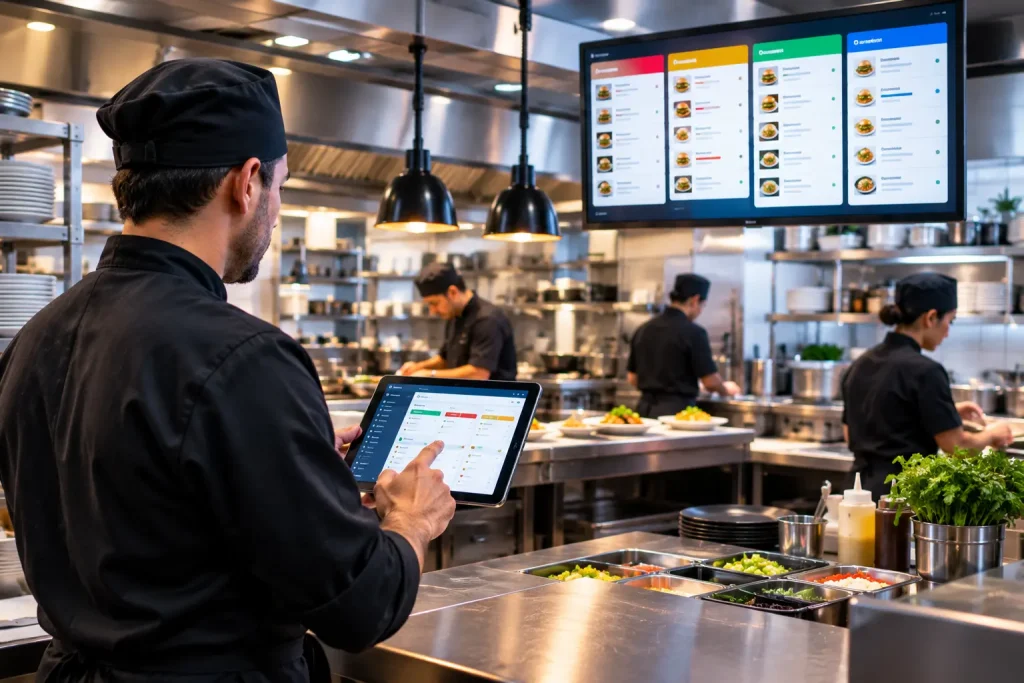
Paper tickets are the number one cause of order errors in kitchens. They get damaged, misread, smudged, or simply lost during a rush. A kitchen display system (KDS) eliminates this entirely. Every order appears on a clear digital screen, instantly, the moment it’s placed.
Special requests, dietary restrictions, and modifications are all displayed automatically. No interpretation required.
3: The Rush Hour Collapse
Every restaurant has a version of this: the first 45 minutes of dinner service are manageable. Then suddenly every table orders at once, and the kitchen stops functioning like a team and starts working like a group of stressed individuals.
A restaurant kitchen management system handles rush hours differently. It automatically queues orders by priority, routes each ticket to the correct kitchen station (grill, pantry, fryer, or desi), and keeps every team member focused on their specific task rather than trying to mentally manage the whole board.
The result? Prep time reduction you can actually measure, often 30–40% during peak service.
4: The Management Blind Spot
Ask any restaurant owner about their kitchen’s actual order accuracy rate. Most can’t tell you. Question them about which menu items are quietly losing money. Blank stare.
This isn’t a criticism, but just the reality of managing a kitchen without performance analytics. You’re making expensive decisions (menu pricing, staff scheduling, ingredient ordering) based on instinct instead of data.
A modern real-time dashboard integrated with a restaurant kitchen management system gives you the following:
- Orders completed per shift
- Average customer wait time per station
- Best-selling menu items and deadweight dishes
- Staff productivity metrics per team member
- Actual vs. expected food cost variance
5: Managing Multiple Locations Is a Nightmare
If you run more than one restaurant branch, coordinating operations manually is nearly impossible. A centralized dashboard in a cloud-based KMS allows managers to monitor all branches from a single screen.
You can spot which location has a bottleneck, push menu changes across all branches simultaneously, and maintain quality consistency everywhere without physically being there.
Multi-location restaurants using centralized dashboards report 40% faster response times to operational issues compared to those without digital systems.
6: Slow Onboarding and High Staff Turnover
Restaurant staff turnover is one of the industry’s biggest challenges. The last thing you want is a complicated system that takes weeks to learn.
Modern kitchen management software is designed with a user-friendly interface that requires minimal training. Most staff are up and running within a single shift, which means lower onboarding costs and faster service from day one.
This is the information that separates restaurants that grow from restaurants that merely survive.
The Features of Restaurant Kitchen Management System You’ll Actually Use Every Day
After the setup excitement fades, most restaurant operations settle into using about five to seven features regularly. Based on how kitchens actually work day-to-day, these are the ones that deliver consistent daily value:
- The digital KDS display is the one thing everyone uses in every single service.
- Order status updates (in progress → ready) reduce front-of-house confusion dramatically.
- KDS and POS integration enable your kitchen system to talk to your point-of-sale system automatically.
- Low-stock alerts through an integrated back office system catch inventory issues before they become service problems.
- The automated order routing feature sends each ticket to the right station without staff intervention.
- Order routing by station is especially valuable during peak hours.
- Special request visibility, dietary needs, and modifications are displayed automatically.
The more advanced features, AI-powered predictive analytics, IoT temperature monitoring, and HACCP compliance tracking, become more useful as your operation matures and your team gets comfortable with the basics.
What Does a Kitchen Management System Integrate With?
A kitchen management system is only as useful as the systems it connects to. At minimum it should integrate with your POS, your online ordering channels, your delivery dispatch, your inventory and back office, and your tax reporting.
A KMS running in isolation just moves paper tickets onto a screen. A connected one removes work from every part of the operation.
Point of sale. The foundational connection. The moment a bill line is entered at the counter or on a handheld, the ticket should already be on the kitchen screen. If your POS and KMS do not talk automatically, someone is retyping orders, and that is where errors start.
Online ordering and phone orders. Orders from your ordering app and from your call centre should enter the same queue as dine-in orders, in the same format. Two separate queues means two sets of mistakes.
Delivery dispatch. When the kitchen marks an order ready, the rider app should already know. This is the difference between a rider leaving with hot food and a rider waiting fifteen minutes at your counter while the food cools.
Inventory and back office. Consumption recorded in the kitchen should flow straight into your restaurant back office and accounting system so that stock levels, wastage, and food cost percentage are calculated from what actually happened, not from a manual count taken three days later.
Third-party delivery platforms. Aggregator orders should appear on the same kitchen display as everything else. Ask any vendor specifically how this works, because “we support delivery” and “delivery orders appear on your KDS automatically” are two very different claims.
Tax and compliance reporting. In Pakistan, sales recorded in the system feed your FBR and provincial reporting. A kitchen that runs on paper creates gaps that someone has to reconcile later.
Food Safety Records Are an Integration Too
Kitchen software that captures prep times, hold times, and temperature logs is also building the record trail food safety systems depend on. The internationally recognised framework here is HACCP, and the seven HACCP principles published by the U.S. Food and Drug Administration end with record-keeping and documentation for exactly this reason: a control you cannot evidence is a control you do not really have.
For restaurants in Punjab, the same digital records make routine hygiene inspections far less stressful, because the answers to an inspector’s questions already exist in the system rather than in someone’s memory.
Top Advantages of Kitchen Management Software for Restaurants
Closes the Gap Between Front and Back of House
The single biggest source of kitchen errors is not the cooking; it is the communication. A server takes an order, walks to the kitchen, calls it out or hands over a ticket, and somewhere in that chain, something gets missed. A KDS eliminates that chain entirely.
The moment an order is placed through your POS, it appears on the kitchen display in real time. There is no walking, no shouting, and no paper involved. Whether the order comes from a table, a self-service kiosk, an online delivery platform, or the bar, it all flows into the same digital display in the same format. Your kitchen team sees everything it needs to see, exactly when it needs to see it.
Sales Tracking and POS Integration
It keeps a complete record of sales and helps calculate the profits and taxes your restaurant needs to pay. The kitchen order management system also includes a tablet ordering system and an integrated POS management system. Orders are placed digitally, table reservations are managed online, and stock is tracked in a clear, accessible, and organised way.
Order Accuracy Goes Up Dramatically
Handwritten tickets are one of the most persistent sources of wrong orders in restaurants. Abbreviations get misread. Special instructions get skipped. Modifications get forgotten when the kitchen is slammed.
With a KDS, every order is transmitted exactly as it was entered, complete with the dish name, any substitutions, dietary requirements, and special requests. Nothing is interpreted. Nothing is assumed. The chef reads the screen the same way every time. This consistency increases the kitchen efficiency.
Fewer wrong orders means fewer remakes, fewer table complaints, and fewer customers who leave politely and never return.
Faster Service Without Adding Pressure
One of the counterintuitive things about a KDS is that it speeds up service not by making your team work harder, but by removing the friction that slows them down. Orders are automatically time-stamped and colour-coded by how long they have been waiting. Fresh tickets are calm. Older tickets shift to yellow, then red, creating a natural visual priority system. This requires no management intervention.
Your kitchen staff can see at a glance what needs to go out first. They do not have to mentally sort through a board full of paper tickets or wait for someone to call the next order. The result is a measurable reduction in average ticket times and customers who notice that their food arrives while it is still hot.
Your Kitchen Becomes More Sustainable
This advantage does not always make the top of the list, but it matters more than most restaurant owners realise. A busy kitchen running paper tickets can go through thousands of chits every week. That is a recurring cost and an environmental one.
Switching to a KDS eliminates paper tickets entirely. No printing supplies, no paper waste, and no ink. For restaurants trying to build a more sustainable operation, increasingly something customers notice and appreciate, going paperless in the kitchen is a straightforward step that happens naturally as part of the KDS transition.
Choosing the Right System: 7 Questions to Ask Every Vendor
When you’re evaluating kitchen management software options, most vendors will show you the best-case demo with perfect conditions and fast internet. Here’s what to actually ask:
1. Does it integrate with my existing POS?
KDS and POS integration are the foundation. If the two systems don’t talk to each other automatically, you’re creating manual work somewhere, and that’s where errors happen.
2. How does it handle third-party delivery orders?
If you receive orders from delivery apps, those need to land in the same kitchen display system as your dine-in orders. Ask specifically how third-party delivery integration works.
3. Can it route orders to different kitchen stations?
Automated order routing to specific stations (grill, desi, fryer, pantry) is essential for organised back-of-house operations. Confirm this is a core feature, not an upgrade.
4. What does the inventory tracking actually track?
Some systems offer basic stock counts. Others, as an integrated system, offer predictive ingredient tracking, expiration date management, and daily usage calculations based on sales. Know which level you’re getting.
5. What does the reporting actually show?
Ask to see a real sample report, not a mock-up. You want real-time dashboard data on order accuracy, average ticket time, food cost percentage, and staff productivity. Vague “analytics” that don’t answer operational questions aren’t useful.
6. Is it cloud-based?
A cloud-based kitchen platform means your data is accessible from anywhere, updates happen automatically, and you’re not dependent on a local server that can fail on a Saturday night.
7. What does onboarding actually look like?
Ask: How long before my team is fully trained? What to do if something goes wrong during busy hours? What is the support process? A user-friendly interface with real support behind it is worth far more than a feature-rich system nobody can use under pressure.
The Bottom Line: Making the Decision
Manual kitchen operations had a good run. For a long time, they were the only option. Today, they’re at a competitive disadvantage.
A restaurant kitchen management system isn’t about replacing your team or overcomplicating your kitchen. It’s about giving your team better tools, giving your management better information, and giving your customers a consistently better experience.
The restaurants winning right now, in every city, at every price point, are the ones running smarter back-of-house operations. Not just better kitchens. Smarter ones.
If you’re ready to see what that looks like in practice, CherryBerry RMS offers a fully integrated restaurant kitchen management software built around how real restaurant kitchens actually work. KDS and POS integration, real-time inventory management, automated order routing, and multi-branch dashboards are all in one platform, ready to deploy.
Your food is already good. Now let’s make your kitchen just as good.
Frequently Asked Questions
Is a kitchen management system good for small restaurants?
Absolutely. Small restaurants actually benefit more because they have fewer staff to catch mistakes manually. Even a basic system tightens operations, reduces errors, and gives the owner visibility they would otherwise never have.
What are the advantages of having a kitchen display system?
A KDS eliminates paper tickets, reduces order errors, speeds up preparation times, displays special requests clearly, and keeps front and back of house perfectly in sync without any shouting or manual handoffs.
What problems does a kitchen management system actually solve in a restaurant?
Honestly, it solves the three things that silently kill restaurants: wrong orders, ingredient waste, and management blind spots. Once you have real-time order tracking and inventory alerts running, you stop losing money you did not even know you were losing.
Is it worth investing in a kitchen management system for a single-branch restaurant?
Yes, and arguably more so than for a chain. A single location has no backup if the kitchen collapses during a rush. A management system gives you structure, consistency, and data that one restaurant absolutely needs to compete against bigger names.
How long does it take for kitchen staff to learn a kitchen management system?
Most modern systems are designed to be intuitive. The majority of kitchen staff are comfortable with the basics within a single shift. Your staff confidence with all features usually increases within the first week of regular use.
Can a kitchen management system help with staff turnover?
More than most owners expect. When processes are digitally guided rather than verbally taught, new hires get up to speed faster. They follow the screen instead of relying on memory, which means fewer mistakes and less pressure on senior staff during training.
What data does an integrated kitchen management system actually give you?
You get average ticket times per station, order accuracy rates, best and worst-performing menu items, staff productivity per shift, food cost variance, and peak hour patterns. It turns gut-feel decisions into ones backed by actual numbers.
We keep running out of ingredients mid-service. Would a KMS fix this?
That is exactly what this system is designed for. Real-time stock tracking and automatic low-stock alerts mean you know you are running low before service starts, not halfway through when a customer has already ordered the thing you just ran out of.
Does a cloud-based kitchen management system work in Pakistan?
Yes, and several providers specifically serve the Pakistani restaurant market. As long as you have a stable internet connection, cloud-based systems work perfectly and give you the added benefit of managing everything remotely from your phone.
How is a CherryBerry RMS kitchen management system different from just using a regular POS?
A POS handles billing and payments. An integrated kitchen management system handles everything that happens after the order is placed, routing it to the right station, tracking prep time, managing stock, and generating performance data. Your POS, online ordering system, kitchen management system, back office system, and rider app work together but do very different jobs.
How does a restaurant kitchen management system work step by step?
It receives the order from any channel, routes it to the correct kitchen station, time-stamps and colour-codes the ticket by age, deducts ingredients from stock as the dish is prepared, marks the order ready for service or dispatch, and stores the full cycle as performance data.
What should a kitchen management system integrate with?
At minimum your POS, your online ordering app, your call centre orders, your delivery or rider dispatch, and your inventory and back office system. Third-party aggregator orders and tax reporting should also flow into the same system rather than being handled separately.
Does a kitchen management system help with food safety and PFA compliance?
Indirectly, yes. It does not replace hygiene practices, but it creates a digital record of prep times, hold times, stock rotation, and expiry dates. The Punjab Food Authority enforces food hygiene and quality standards across Punjab through routine inspections, and having those records already logged makes an inspection far easier to conduct. Licensing and hygiene obligations themselves must still be confirmed directly with PFA.