


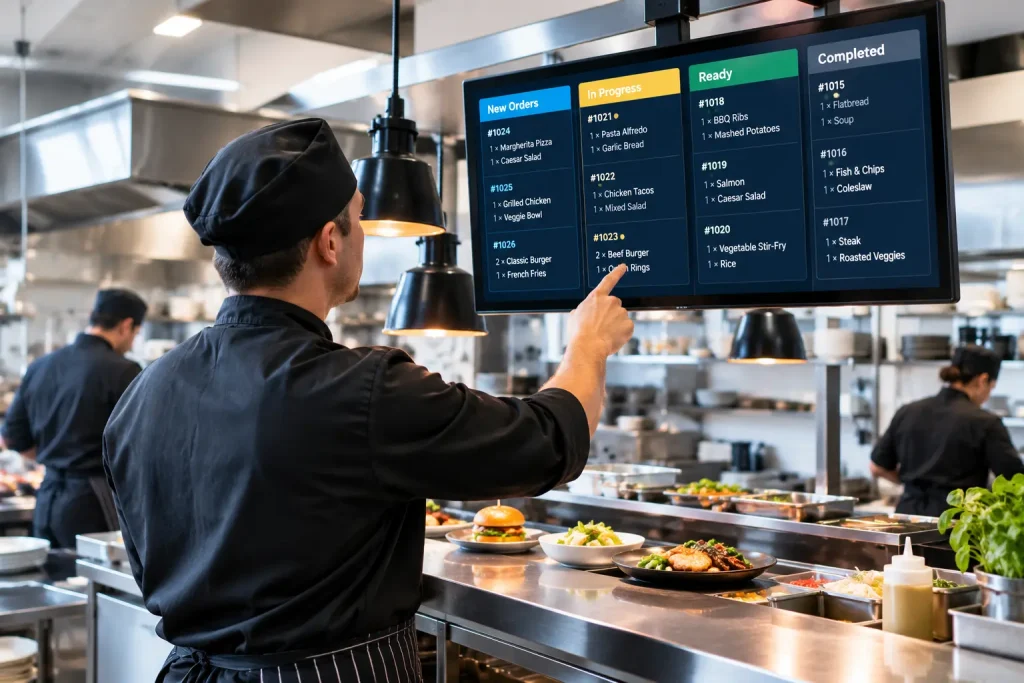
A restaurant kitchen display system is a screen setup that replaces paper tickets in the kitchen. Orders travel from the POS to the correct station screen, arrive time-stamped, and are updated as the kitchen works through them. Most kitchens need one screen per station plus one at the pass.
Today, the restaurant industry has moved to online food ordering and digital payment systems to ensure efficient services. Meanwhile, the staff is facing fewer challenges in managing customers’ orders from various channels. However, integrating the right technology can improve how restaurants run their routine processes. The Restaurant Kitchen Display System is one such flexible tool that ensures efficient performance.
It is a software solution that is designed to help restaurants streamline their routine kitchen processes. A kitchen display system (KDS) also improves communication between the front and back of house in a restaurant. When a customer places an order in a restaurant, it is automatically sent and displayed on the system’s screen with relevant information like the ordered item, table number,r or any other particular request. Let’s learn more about the important benefits of this system.
This article focuses specifically on the display layer: how the screens work, where they go, and what to get right when you install them. The KDS is one part of a wider system that also covers inventory, recipes, and cost reporting. If you want the full picture, our complete guide to the restaurant kitchen management system covers how all of those pieces fit together.
How Latest Display System is Different from Traditional Methods?
This latest digital system has been used in commercial kitchens and has replaced the traditional methods of taking orders. Before the arrival of this technology, wait staff wrote the customer’s orders on paper or issued a ticket and conveyed the order information to the kitchen staff. After the preparation of food, the kitchen staff informs the wait staff about the completion of the order before presenting it to customers.
In some restaurants, servers convey the order verbally to the kitchen staff, that was also prone to errors. However, the latest digital order viewer system streamlines a restaurant’s order-taking and food preparation operations. Now, wait staff take customers’ orders via tablets and it is automatically sent to the display system in the kitchen. Kitchen staff can see the real-time status of the orders and can prepare the food accordingly.
How Does This System Work?
Another perk of this technology is its integration capabilities. Restaurants can integrate this system with point-of-sale (POS) systems and inventory management software to maximise performance. This digital solution helps restaurants handle their kitchens efficiently and stay updated about real-time information on the orders through POS systems ensuring accuracy.
When an order entry is made in the POS system, it is automatically delivered to the display system. Then the system routes the order to the relevant person in the kitchen. For example, the grill order will be sent to the person responsible for working at the grill station. Likewise, the orders for the fried dishes will be delivered to the cook working on the stove.
Wait staff or servers can access all order information in the system and can also make necessary changes to ensure quick preparation of food. The KDS system automatically prioritises ordered food items on the basis of time and also tracks the order progress. The system automatically sends alerts to the waitstaff when the order gets ready to serve. Moreover, the system automatically marks the orders as complete and prints a ticket for the customers.
Administration can generate reports through this system and can also identify areas that need improvement. Indeed, KDS is necessary for commercial kitchens to enhance operational efficiency and staff communication.
The quality of that POS connection matters more than most operators expect. A native integration means the order reaches the kitchen screen the moment it is entered, with modifiers intact and no second entry anywhere.
A weak connection means someone re-types orders, and re-typing is where mistakes come back. This is one reason many restaurants pair their screens with a cloud-based POS system, since both layers then read from the same data rather than syncing between separate machines.
How KDS can Prove Beneficial For Your Restaurant?
A Restaurant Kitchen Display System provides an overview of the dishes that the chefs have to prepare. This facility allows them to plan and prepare dishes in a timely and more efficient manner. Here are some more advantages of using KDS for businesses.
Efficient Menu Management & Routing Feature: Restaurants can easily manage their menus and add or remove food items regularly. They can also update seasonal and special deals over the system. Moreover, as orders are received, the system automatically routes them to relevant cooks to ensure the timely preparation of food items.
Enhances Order Accuracy: Manual order management is prone to errors. However, digital display systems reduce the likelihood of human errors in taking orders and preparing food. This further enhances order accuracy and customer satisfaction levels.
Ensure Faster Order Processing: This system quickly displays the food orders on the kitchen screen, enabling kitchen staff to prepare meals. It reduces order processing times and enhances productivity, especially during peak hours.
Promote Collaboration: Better communication between front-of-house and back-of-house staff leads to higher sales. The digital display system facilitates this communication and keeps them on one page. It enables waitstaff to send their orders directly to the kitchen system and keep the cook updated about the status of orders to ensure smooth operation.
Allow Real-Time Monitoring: Restaurant administration can stay updated about the latest status of order processing and kitchen operations. They can identify issues and can make adjustments to maintain the quality of services.
Additional Benefits
Reduce Clutter: The traditional ticket system produces a significant quantity of waste, but the latest digital display systems are eco-friendly. In the presence of these systems, there is no need for paper tickets that reduce mess in the restaurant kitchen.
The scale of that waste is easy to underestimate. According to the United States Environmental Protection Agency, paper and paperboard made up the largest single component of municipal solid waste in 2018, at 67.4 million tons, or 23.1 percent of the total. A single busy kitchen printing tickets through every service contributes to that stream all year, along with a recurring bill for paper rolls and printer maintenance that nobody enjoys paying.
Inventory Management: Industry research shows that restaurants using integrated kitchen systems report 20 to 30 percent reductions in food waste within the first few months of implementation. For an average full-service restaurant, that translates to thousands of dollars in annual savings.
Allow Order Prioritisation: The kitchen display systems automatically prioritise the food orders considering order types like takeout, dine-in and delivery and cooking time. With this facility, kitchen staff can efficiently manage their workload.
Setting Up a Kitchen Display System: What Actually Matters in a Real Kitchen
Most guides on this topic stop at the software. The part that decides whether staff actually use the system is physical, and it is decided in the first week of installation. A screen in the wrong place quietly trains your team to ignore it.
Start with how many screens you need. The usual rule is one screen per station that cooks independently, plus one at the pass where dishes are assembled and checked. A small café with one line may only need two.
A restaurant with a grill, a fryer, a desi station, and a cold section needs a screen for each, because a shared screen forces every cook to scan past items that are not theirs. That scanning is exactly the delay you bought the system to remove.
Placement matters just as much as count. Mount screens at eye level for a standing cook, not above head height where they need to look up mid-service. Keep them out of direct steam and away from the heat line, and check for glare from overhead lights and windows at the actual times your team works, not at noon on installation day. A screen that reflects a ceiling light at 8 pm is unusable at 8 pm.
Then decide how staff will interact with it. Bump bars are physical buttons, so cooks can clear tickets without touching a screen with wet or greasy hands. Touchscreens are more flexible and usually cheaper, but they need cleaning during service, and they are slower to hit accurately in a rush. Many kitchens end up mixing the two, using bump bars on hot stations and touchscreens at the pass.
Finally, treat the network as part of the install. Screens depend on a connection, so a router without a UPS is a weak point that will find you on a Friday night. Run a second connection if you can, and test the whole setup during a real service before you retire the printer.
Common Mistakes When Rolling Out a Kitchen Display System
The most frequent mistake is going live on a busy night. It feels efficient to switch when volume is high, but a new system plus a full dining room means your team learns under pressure and blames the software for the chaos. Choose a quiet weekday instead, and keep the printer connected in parallel for the first few services.
The second mistake is training only managers. Your line cooks and hosts use the screens far more than any manager does, and they are the ones who will find the awkward parts. Put a cook in front of the system before you commit to it, give them no instructions for ten minutes, and watch where they hesitate. That exercise usually reveals more than the vendor demo did.
The third is failing to record a baseline. Before you switch, note your current average ticket times and how often orders come back wrong. Without those numbers, you will have opinions about whether the system helped, but no evidence. Restaurants that measure before and after almost always find the improvement sits in one specific station rather than spread evenly across the kitchen.
The context for all of this is a tighter margin environment than restaurants faced a few years ago. The National Restaurant Association’s 2026 State of the Restaurant Industry report found that 42 percent of operators said their restaurants were not profitable in 2025 with the association pointing to operational innovation and technology as levers for easing cost pressure. A rollout that goes badly is not just an inconvenience in that climate, so it is worth doing slowly.
Concluding Remarks
Indeed, Restaurant Kitchen Display Systems have emerged as a must-have technology for restaurants to streamline their operations. Accuracy in orders, faster service, and improved communication all contribute to a positive dining experience. This system enhances the overall efficiency of your kitchen staff and customer satisfaction level. Moreover, this digital system is typically mounted on the restaurant wall in the kitchen to help kitchen staff track and prepare incoming orders. If you are looking for a reliable service to integrate this system into your restaurant, contact Cherry Berry RMS experts today.
Frequently Asked Questions restaurant-kitchen
What is a restaurant kitchen display system?
It is a screen setup that replaces paper tickets in a commercial kitchen. Orders travel from the point of sale to the correct station screen, arrive time-stamped, and are updated as the kitchen works through them. Staff clear each ticket when the dish is ready, which tells the front of house without anyone having to walk or shout.
How many kitchen display screens does a restaurant need?
The usual rule is one screen per station that cooks independently, plus one at the pass. A small café may only need two. A restaurant running a grill, a fryer, a desi station, and a cold section needs a screen for each, because shared screens force cooks to scan past items that are not theirs.
What is the difference between a KDS and a kitchen management system?
Ament system includes that, plus inventory, recipes, food costing, and reporting. If the software can tell you what your kitchen consumed and what it cost, you are looking at a management system rather than a display system. The nine components of a kitchen management system explain how those parts depend on each other.
Should I choose a bump bar or a touchscreen?
Bump bars use physical buttons, so cooks can clear tickets with wet or greasy hands. Touchscreens are more flexible and usually cheaper, but they need cleaning during service and are slower to hit accurately in a rush. Many kitchens use bump bars on hot stations and touchscreens at the pass.
Does a kitchen display system work without the internet?
Cloud-based systems depend on a connection by design, so plan a backup. Put the router on a UPS rather than only the screens, and consider a second connection on a different network. The trade-off is that your data is never trapped on a single machine in your back office.
Can a KDS handle delivery and online orders?
It should. Orders from your website, ordering app, phone, and delivery platforms should all land in the same queue as dine-in tickets. If any channel arrives on a separate tablet that someone has to remember to check, that is where missed orders come from.